Fuel receipt template
Fuel receipt template for independent stations, marinas and mobile refuellers: grade, litres and price per litre, pump number, vehicle and how it was paid.
Templates by industry
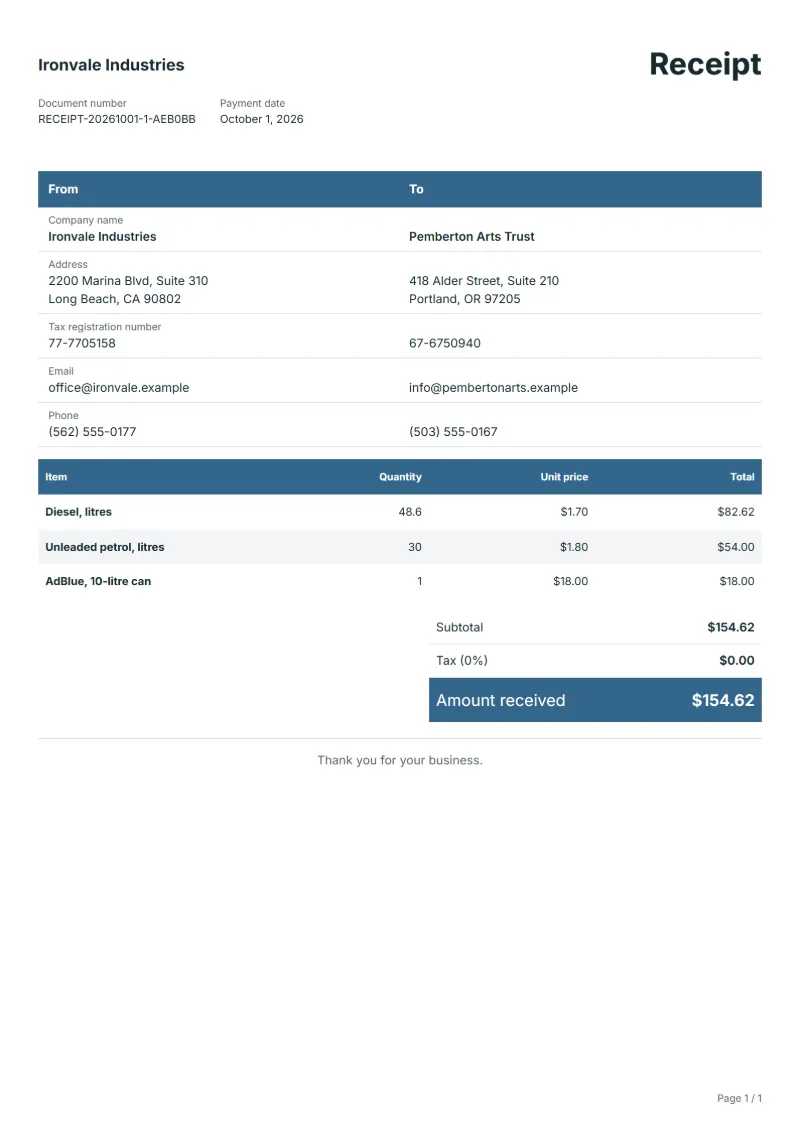
- Diesel, litres
- Unleaded petrol, litres
- AdBlue, 10-litre can
Preparation guide
Example workflow
Match the payment to the invoice
Example: check the payment for "Diesel, litres" against the invoice it settles: the invoice number, the amount received and any balance still owed.
Record the payment
Enter the payment date, the payment method and the amount received, and check each line this payment covers, down to "AdBlue, 10-litre can".
Send the receipt
Send the receipt to the customer and mark the invoice as paid; if a balance remains, keep the invoice open for it.
Big station chains print fuel receipts from the till, but a marina pontoon, a small airfield, a farm co-op pump or a mobile tanker topping up a building site’s generators often writes them by hand. Fleet and boat owners need the litres, the grade and the price per litre to check consumption and to claim the cost. This template lists each grade with its litres to one decimal place, keeps additives apart, and leaves room for the pump and the vehicle.
Fields to prepare
- Deliverables and line items
- Diesel, litres, Unleaded petrol, litres, AdBlue, 10-litre can: the lines this payment covers, as they appear on the invoice it settles.
- Diesel, litres
- Copy litres and price per litre from the pump display; a total without litres is useless for checking consumption.
- Unleaded petrol, litres
- If the same customer took two grades, as a van and its generator might, keep them on separate lines with their own prices.
- AdBlue, 10-litre can
- Sell AdBlue or oil by the can with its size; it is not fuel and some expense rules treat it differently.
- Payment details
- Record the payment date, the method (bank transfer, card or cash) and the amount received, exactly as it arrived.
- Invoice reference
- Quote the number of the invoice this payment settles; for a part payment, note the balance still owed.
- Scope to agree
- Show the fuel grade, litres and price per litre as the pump displayed them, the pump or tank number, and the vehicle or vessel the fuel went into.
Before sending
- Does “Diesel, litres” match the line on the invoice this payment settles?
- Has the money for “Unleaded petrol, litres” actually arrived, in full or in part?
- Is “AdBlue, 10-litre can” shown at the amount received, with any balance still owed noted?
Show 3 more
- Confirm the money has actually arrived before you issue the receipt.
- Check that the amount received matches the invoice, and note any difference as a balance or an overpayment.
- Quote the invoice number it settles, and keep receipt numbers in a sequence of their own.
Worked example with sample figures
The figures below are invented to show how the template adds up: 3 lines in USD, with an example tax rate of 8%.
| Item | Quantity × unit price | Amount |
|---|---|---|
| Diesel, litres | 48.6 × $1.70 | $82.62 |
| Unleaded petrol, litres | 30 × $1.80 | $54.00 |
| AdBlue, 10-litre can | 1 × $18.00 | $18.00 |
| Subtotal | $154.62 | |
| Sales tax (8%) | $12.37 | |
| Total | $166.99 | |
Amount received $166.99, of which sales tax $12.37.
What the document must show
The details a receipt has to show, and why each one matters, are set out in the guide below.
The sales tax depends on where the work is supplied, so set the rate that applies to your customer before sending.
Official rate reference: US government: state and local taxes
Full requirements: What a receipt must show (and receipt vs invoice)
Frequently asked questions
A fleet customer fills up several vehicles at once. How do I write that?
One line per vehicle and grade, with the registration in the description. The fleet manager allocates fuel to vehicles, so a single total for the whole visit makes extra work for them.
Should the receipt show fuel duty or other levies?
Only if your customers expect it and you know the figures. Most fuel prices already include such duties; show the tax your registration requires and check the rest with your adviser.
How is the sales tax worked out on this receipt?
The worked example above uses an example rate of 8%: $12.37 on a net amount of $154.62, for a total of $166.99. The editor recalculates all three when you change a quantity, a price or the country.
Can I download it as Excel, Word or PDF?
Yes. A PDF needs no account: fill in the template and use Print / PDF. The Excel and Word files download from this page with a free account, and the spreadsheet keeps its formulas, so changing a quantity updates the tax and the total.
Can I use it in another language or currency?
Yes. The document language can be set to any of 33 languages, and changing the country setting updates the currency, the date format and the tax rate.
Read next
Reading for the Fuel receipt template: What a receipt must show (and receipt vs invoice) and Quote, proforma, invoice, receipt, credit note: which to use. To add tax or check a total, use the VAT and GST calculator.