Refund and cancellation note template
Refund and cancellation note template: the cancelled order or returned items, the original invoice, the amount returned and when. Word, Excel or PDF.
Free generators
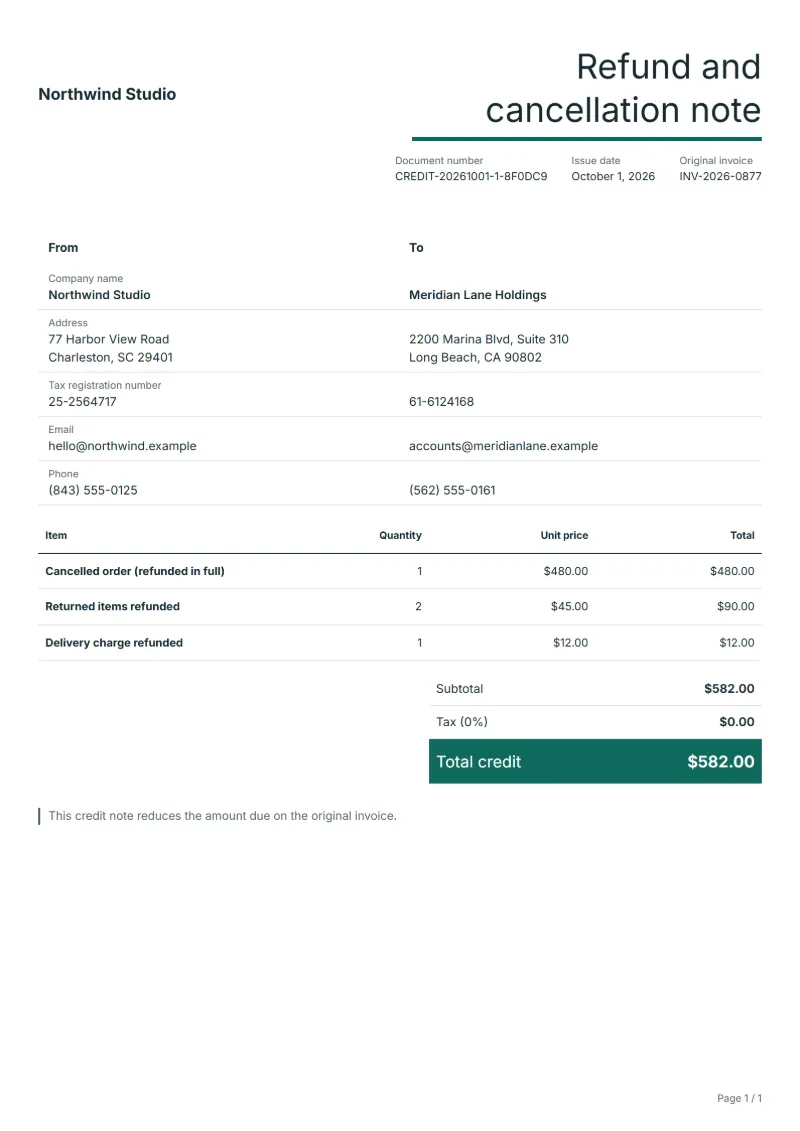
- Cancelled order (refunded in full)
- Returned items refunded
- Delivery charge refunded
Preparation guide
Example workflow
Identify the invoice and the reason
Example: for "Cancelled order (refunded in full)", find the original invoice, note its number and date, and record the reason: a return, a price reduction or a cancellation.
Credit the affected lines
Enter the quantity or amount credited for each affected line, down to "Delivery charge refunded", so the tax on it is reversed in proportion.
Send and settle the credit
Send the credit note to the customer, then refund the amount or set it off against the next invoice, and keep both documents together.
Online shops, tour operators and service businesses issue this note when an order is cancelled or goods come back, recording the refund against the original invoice. The customer checks three things on it against their card or bank statement: how much comes back, by what route and on which date. The sample combines a full cancellation, a partial return and a refunded delivery charge, three cases that often meet in a single note.
Fields to prepare
- Deliverables and line items
- Cancelled order (refunded in full), Returned items refunded, Delivery charge refunded: only the lines being reduced or cancelled, with the quantity or amount credited.
- Cancelled order (refunded in full)
- Give the order number and the date it was cancelled; a full cancellation credits every line of the original invoice.
- Returned items refunded
- Enter the items and quantities actually received back, not the quantity the customer said they sent.
- Delivery charge refunded
- Refund delivery when the law, your terms or the reason for the return call for it, as EU rules do for a consumer who withdraws from an online order; keep it on its own line.
- Original invoice
- Quote the number and date of the invoice being corrected, and the reason: a return, a price reduction or a cancellation.
- Settlement
- Say how the credit is settled: refunded to the customer or set off against the next invoice.
- Scope to agree
- Name the cancelled order or the items refunded, the original invoice, the amount returned and how and when it is paid back. It reduces what the original invoice asked for.
Before sending
- Is “Cancelled order (refunded in full)” one of the lines being corrected, at the price on the original invoice?
- Is the quantity or amount credited for “Returned items refunded” no more than was invoiced?
- Does the customer know why “Delivery charge refunded” is credited: a return, a price change or a cancellation?
Show 3 more
- Credit only the affected lines, and reverse the tax on them at the rate the original invoice used.
- Give the credit note a number of its own rather than reusing or changing the original invoice number.
- Agree with the customer whether the credit is refunded or set off before you send it.
Worked example with sample figures
The figures below are invented to show how the template adds up: 3 lines in USD, with an example tax rate of 8%.
| Item | Quantity × unit price | Amount |
|---|---|---|
| Cancelled order (refunded in full) | 1 × $480.00 | $480.00 |
| Returned items refunded | 2 × $45.00 | $90.00 |
| Delivery charge refunded | 1 × $12.00 | $12.00 |
| Subtotal | $582.00 | |
| Sales tax (8%) | $46.56 | |
| Total | $628.56 | |
Credit before tax $582.00, sales tax reversed $46.56, total credited $628.56.
- The credit corrects invoice INV-2026-0877.
What the document must show
The details a credit note has to show, and why each one matters, are set out in the guide below.
The sales tax depends on where the work is supplied, so set the rate that applies to your customer before sending.
Official rate reference: US government: state and local taxes
Full requirements: Credit note vs invoice (and credit memo): how to issue one
Frequently asked questions
How should the money go back to the customer?
Through the channel they paid with where you can, card to card or transfer to the same account. Write the method and the refund date in the notes, so the customer knows what to look for on their statement.
Only part of an order came back. Do I cancel the whole invoice?
No. Credit only the returned lines; the rest of the invoice stays as it was, paid or payable. The note’s total then shows exactly what goes back to the customer.
How is the sales tax worked out on this credit note?
The worked example above uses an example rate of 8%: $46.56 on a net amount of $582.00, for a total of $628.56. The editor recalculates all three when you change a quantity, a price or the country.
Why issue a credit note instead of editing the invoice?
An invoice you have sent is part of both parties' records. A credit note with its own number, the original invoice number and the reason reduces or cancels it, so both sets of books stay traceable.
Can I add my logo and signature?
Yes. The From section of the editor has a place for your company logo and for a signature or seal image. Uploading a picture needs a free account, and a member can keep both in settings so that every new document starts with them.
Read next
Reading for the Refund and cancellation note template: Credit note vs invoice (and credit memo): how to issue one and Unpaid invoice: follow-ups, part payments and statements. The VAT and GST calculator helps you credit the tax that went with the goods.