DevOps retainer invoice template
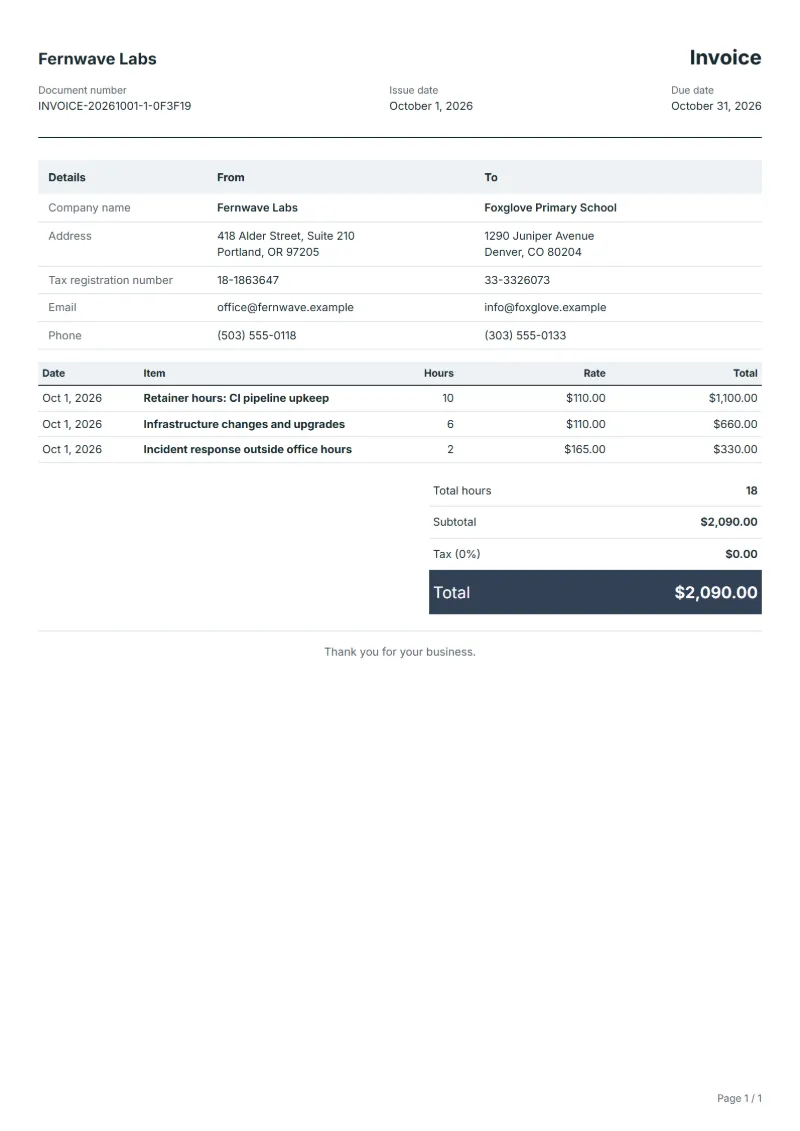
DevOps retainer invoice template billed by the hour: pipeline upkeep within the retainer, infrastructure changes and out-of-hours incidents at their own rate.
Templates by industry
- Retainer hours: CI pipeline upkeep
- Infrastructure changes and upgrades
- Incident response outside office hours
Preparation guide
Example workflow
Confirm scope and quantities
Example: reconcile the approval and work record for "Retainer hours: CI pipeline upkeep" to establish the quantity for this invoice.
Record delivery and acceptance
Check completion for every line, including "Incident response outside office hours". Deliver the agreed test results and configuration notes, and assign owners for outstanding items.
Send the billing record
Send the final charges, delivery reference and due date to the customer, then reconcile payment against the invoice number.
Many software teams keep an outside DevOps engineer on a retainer: a block of hours each month for keeping builds green, servers patched and deployments boring. The invoice has to answer two questions, how much of the block was used and what happened beyond it. This template bills routine pipeline upkeep inside the retainer, planned infrastructure changes as separate hours, and night or weekend incidents at the higher rate agreed, each with a reference the team can look up.
Fields to prepare
- Deliverables and line items
- Retainer hours: CI pipeline upkeep, Infrastructure changes and upgrades, Incident response outside office hours: record the quantities actually supplied and the service period.
- Retainer hours: CI pipeline upkeep
- Show used hours against the monthly block, and say whether unused hours roll over or lapse.
- Infrastructure changes and upgrades
- Name each change, such as a database version upgrade, and the ticket that approved it.
- Incident response outside office hours
- Give the start time and duration of every incident call-out and the incident report it belongs to.
- Environment and dependencies
- Record target systems, integration counts, data volume and who supplies test access.
- Acceptance and support
- Set acceptance scenarios, the review window, support duration after handover and excluded work.
- Scope to agree
- Show the retainer hours used against those agreed, put out-of-hours incidents at their own rate, and link each block of work to a change or incident record.
Before sending
- Does “Retainer hours: CI pipeline upkeep” show the quantity actually supplied, not the quantity first quoted?
- Is “Infrastructure changes and upgrades” charged at the rate the customer agreed to, with any change approved?
- Is “Incident response outside office hours” finished and accepted, or does it belong on a later invoice?
Show 3 more
- Separate third-party service charges from implementation fees.
- Agree who handles the production transition and what recovery work is included if it fails.
- Match completed work to the order or approval record, and confirm the payment due date and amounts already received.
Worked example with sample figures
The figures below are invented to show how the template adds up: 3 lines in USD, with an example tax rate of 8%.
| Item | Hours × rate | Amount |
|---|---|---|
| Retainer hours: CI pipeline upkeep | 10 × $110.00 | $1,100.00 |
| Infrastructure changes and upgrades | 6 × $110.00 | $660.00 |
| Incident response outside office hours | 2 × $165.00 | $330.00 |
| Subtotal | $2,090.00 | |
| Sales tax (8%) | $167.20 | |
| Total | $2,257.20 | |
Net amount $2,090.00, sales tax $167.20, total payable $2,257.20.
- Hours in total: 18.
What the document must show
The details an invoice has to show, and why each one matters, are set out in the guide below.
The sales tax depends on where the work is supplied, so set the rate that applies to your customer before sending.
Official rate reference: US government: state and local taxes
Full requirements: How to write an invoice: a step-by-step example
Frequently asked questions
The retainer was not fully used this month. What do I bill?
If the agreement reserves a fixed block, bill the whole block and show the hours used beside it. If it bills hours as they are used, bill only those and leave the balance in the notes.
Who pays the cloud provider's bill?
Normally the client pays the cloud provider directly. If the account is in your name, pass the charges on at cost on separate lines with the provider's invoice number.
How is the sales tax worked out on this invoice?
The worked example above uses an example rate of 8%: $167.20 on a net amount of $2,090.00, for a total of $2,257.20. The editor recalculates all three when you change a quantity, a price or the country.
How should I number invoices?
Use one unbroken sequence per business, never reuse a number, and issue a credit note rather than deleting an invoice you have already sent.
Can I download it as Excel, Word or PDF?
Yes. A PDF needs no account: fill in the template and use Print / PDF. The Excel and Word files download from this page with a free account, and the spreadsheet keeps its formulas, so changing a quantity updates the tax and the total.
Read next
Reading for the DevOps retainer invoice template: How to write an invoice: a step-by-step example and Invoice payment terms: Net 15, Net 30, due dates. The VAT and GST calculator works out the tax line for you.