Data migration quotation template
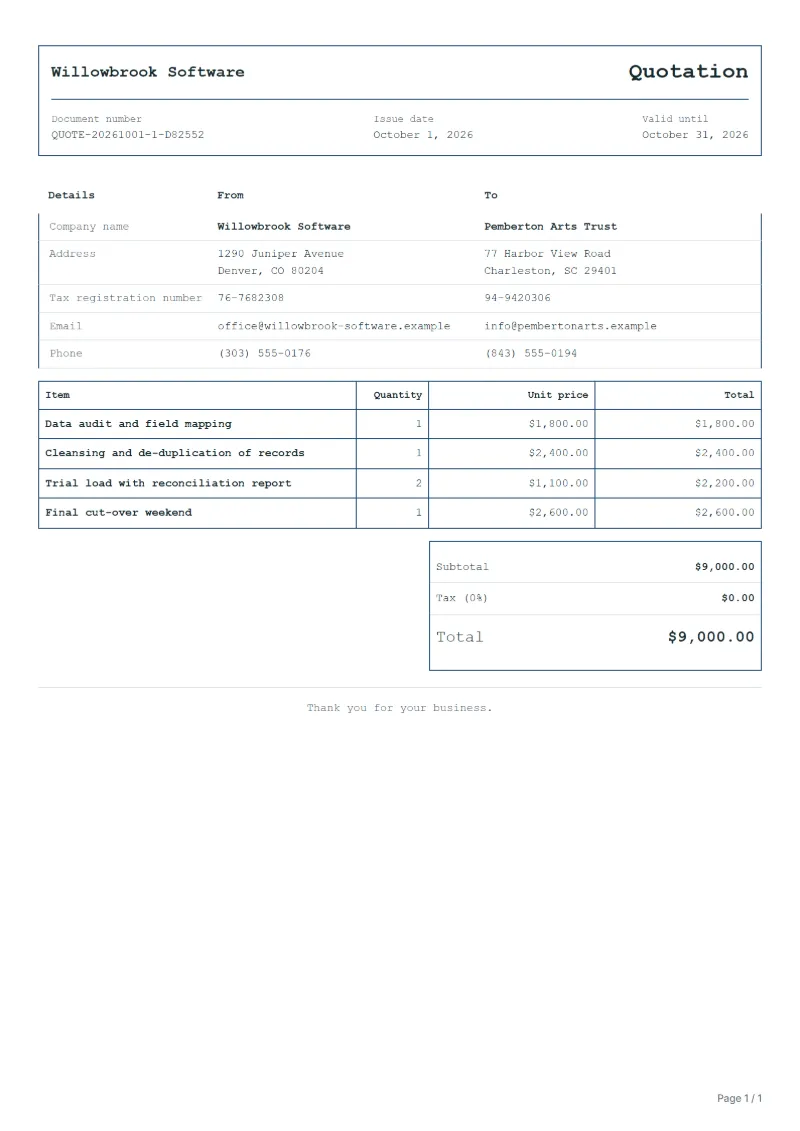
Data migration quotation template: audit and field mapping, cleansing and de-duplication, trial loads with reconciliation, and the final cut-over.
Templates by industry
- Data audit and field mapping
- Cleansing and de-duplication of records
- Trial load with reconciliation report
- Final cut-over weekend
Preparation guide
Example workflow
Confirm scope and quantities
Example: start with "Data audit and field mapping", confirm the required quantity and client inputs, then agree completion criteria for each item.
Review and approve the quotation
Confirm acceptance evidence for "Final cut-over weekend", all line quantities, exclusions and quote validity with the customer, and retain the approved version.
Deliver and prepare billing
Deliver the agreed test results and configuration notes, and assign owners for outstanding items. When the agreed milestone is complete, prepare an invoice using actual quantities and approved changes.
When a company replaces its customer database, accounting package or online shop, the old records have to arrive in the new system complete and clean. Most of the risk sits before the move: fields that do not match, duplicates, and records nobody has touched in years. This template quotes the audit and mapping, the clean-up, one or more trial loads with a report that reconciles counts and totals, and the final cut-over, often planned for a weekend.
Fields to prepare
- Deliverables and line items
- Data audit and field mapping, Cleansing and de-duplication of records, Trial load with reconciliation report, Final cut-over weekend: specify the planned quantity and delivery scope for each item.
- Data audit and field mapping
- Name the source and target systems and the number of records per object, such as customers, invoices and products.
- Cleansing and de-duplication of records
- Say which cleansing rules apply and who decides about records that cannot be matched automatically.
- Trial load with reconciliation report
- Price each trial load and describe the report: record counts, totals and a sample the client checks by hand.
- Final cut-over weekend
- Give the planned cut-over window, the freeze on data entry it needs and the fallback if checks fail.
- Environment and dependencies
- Record target systems, integration counts, data volume and who supplies test access.
- Acceptance and support
- Set acceptance scenarios, the review window, support duration after handover and excluded work.
- Scope to agree
- State the record counts and source systems, quote the trial loads separately from the final move, and agree what counts as a successful reconciliation.
Before sending
- Does “Data audit and field mapping” say what is included and what quantity the price assumes?
- Would the customer read “Cleansing and de-duplication of records” the way you do, including what it leaves out?
- Can you still honour the price of “Trial load with reconciliation report” on the last day the quotation is valid?
Show 4 more
- Does “Final cut-over weekend” say what is included and what quantity the price assumes?
- Separate third-party service charges from implementation fees.
- Agree who handles the production transition and what recovery work is included if it fails.
- Check quote validity, the customer approval method and payment milestones.
Worked example with sample figures
The figures below are invented to show how the template adds up: 4 lines in USD, with an example tax rate of 8%.
| Item | Quantity × unit price | Amount |
|---|---|---|
| Data audit and field mapping | 1 × $1,800.00 | $1,800.00 |
| Cleansing and de-duplication of records | 1 × $2,400.00 | $2,400.00 |
| Trial load with reconciliation report | 2 × $1,100.00 | $2,200.00 |
| Final cut-over weekend | 1 × $2,600.00 | $2,600.00 |
| Subtotal | $9,000.00 | |
| Sales tax (8%) | $720.00 | |
| Total | $9,720.00 | |
Quoted net amount $9,000.00, sales tax $720.00, quoted total $9,720.00.
What the document must show
The details a quotation has to show, and why each one matters, are set out in the guide below.
The sales tax depends on where the work is supplied, so set the rate that applies to your customer before sending.
Official rate reference: US government: state and local taxes
Full requirements: How to write a quotation: format, example and checklist
Frequently asked questions
The client found more old data after the quotation. What happens to the price?
Tie the price to the record counts in the quotation. If volumes grow beyond an agreed margin, quote the extra cleansing and loading as an addition before doing it.
Is a third trial load included if the second one fails?
Say how many trial loads the price covers. If failures come from the client's data decisions, further loads are extra; if they come from your mapping, rerun at your cost.
How is the sales tax worked out on this quotation?
The worked example above uses an example rate of 8%: $720.00 on a net amount of $9,000.00, for a total of $9,720.00. The editor recalculates all three when you change a quantity, a price or the country.
How do I turn an approved quotation into an invoice?
Open the approved quotation and convert it. The original stays unchanged, and the invoice carries the same line items so the customer can match the two documents.
Is this template free?
Yes. You can fill in this template and print it or save it as a PDF without an account, and there is no payment step and no watermark on the document. Saving it to your account and downloading Excel or Word files need a free account.
Read next
Reading for the Data migration quotation template: How to write a quotation: format, example and checklist and Quote to invoice: how to convert a quote, step by step. The VAT and GST calculator adds tax to your quoted prices.