Modelo de fatura online
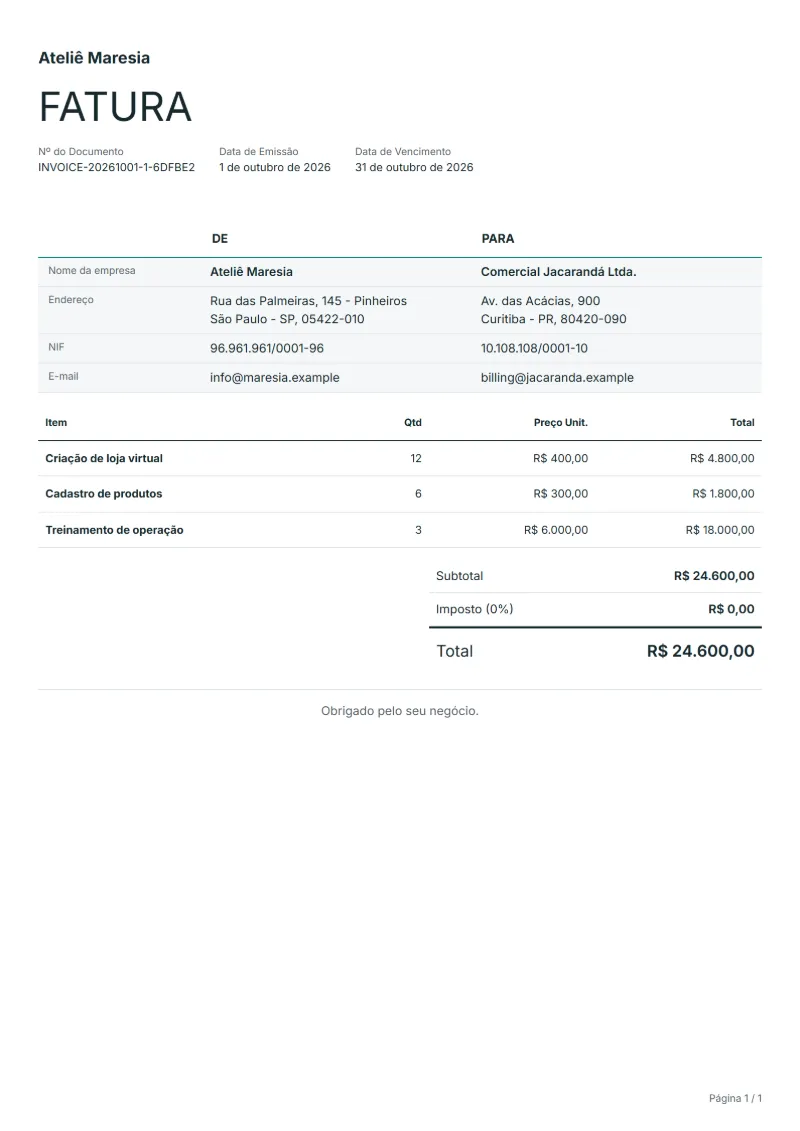
Invoice template in Portuguese (modelo de fatura), set up for Brazil, with sample lines for an online store setup, product listing and training. Excel or Word.
Templates by language
- Online store setup
- Product listing
- Store operations training
Preparation guide
Example workflow
Confirm scope and quantities
Example: reconcile the approval and work record for "Online store setup" to establish the quantity for this invoice.
Record delivery and acceptance
Check completion for every line, including "Store operations training". Deliver the agreed test results and configuration notes, and assign owners for outstanding items.
Send the billing record
Send the final charges, delivery reference and due date to the customer, then reconcile payment against the invoice number.
Brazil handles fiscal documents differently from most countries: the legally relevant record of a sale or service is usually an electronic nota fiscal issued through the tax authorities’ systems, and this template does not replace it. What it offers is an ordinary business invoice in Portuguese, with Brazil preset as the country and amounts in reais, for a Brazilian client or a Portuguese-speaking client abroad. The sample lines cover setting up an online store, loading products and training the team.
Fields to prepare
- Deliverables and line items
- Online store setup, Product listing, Store operations training: record the quantities actually supplied and the service period.
- Online store setup
- Name the platform and what the setup covered, such as theme, payment and shipping options, and bill it as one fixed fee.
- Product listing
- Use the number of products registered as the quantity, and say whether variants such as size and color count separately.
- Store operations training
- Give the training hours, the date and who attended, and note whether a recording or a written guide was handed over.
- Environment and dependencies
- Record target systems, integration counts, data volume and who supplies test access.
- Acceptance and support
- Set acceptance scenarios, the review window, support duration after handover and excluded work.
- Scope to agree
- Set the product and variant counts, store setup scope and operations training hours.
Before sending
- Does “Online store setup” show the quantity actually supplied, not the quantity first quoted?
- Is “Product listing” charged at the rate the customer agreed to, with any change approved?
- Is “Store operations training” finished and accepted, or does it belong on a later invoice?
Show 4 more
- Separate third-party service charges from implementation fees.
- Agree who handles the production transition and what recovery work is included if it fails.
- Match completed work to the order or approval record, and confirm the payment due date and amounts already received.
- Confirm document language (pt), country setting (BR), and the customer's currency and date-format requirements.
Worked example with sample figures
The figures below are invented to show how the template adds up: 3 lines in BRL, with an example tax rate of 8%.
| Item | Quantity × unit price | Amount |
|---|---|---|
| Online store setup | 12 × R$400.00 | R$4,800.00 |
| Product listing | 6 × R$300.00 | R$1,800.00 |
| Store operations training | 3 × R$6,000.00 | R$18,000.00 |
| Subtotal | R$24,600.00 | |
| ICMS/ISS/PIS/COFINS/IPI (transitioning to CBS + IBS) (8%) | R$1,968.00 | |
| Total | R$26,568.00 | |
Net amount R$24,600.00, ICMS/ISS/PIS/COFINS/IPI (transitioning to CBS + IBS) R$1,968.00, total payable R$26,568.00.
What the document must show
These details make an invoice easier to approve and to file.
- Your business name, address and registration or tax number
- The customer's name and address
- Issue date and a document number you do not reuse
- Each line item with quantity, unit price and amount
- Tax shown separately from the net amount, and the total payable
- Payment terms: due date, bank details or accepted payment methods
- In Brazil, invoices may have to be issued as e-invoices (NF-e / NFS-e). A document made in QuoteBill is a printable copy, not a registered e-invoice. Check the rules that apply to you.
The ICMS/ISS/PIS/COFINS/IPI (transitioning to CBS + IBS) depends on where the work is supplied, so set the rate that applies to your customer before sending.
Official rate reference: Receita Federal: Entenda a Reforma Tributaria do Consumo
Frequently asked questions
Does this replace the nota fiscal my client asks for?
No. If your client needs an NF-e or NFS-e, it has to be issued through the official system that applies to you: the state tax authority’s for an NF-e, and for an NFS-e your municipality’s own system or the national NFS-e system, depending on the municipality. This invoice can go with it as a commercial summary of the work and the payment terms.
Can I use it for a client in Portugal?
Yes, the wording is Portuguese, but change the country setting to Portugal so the currency and the tax line follow Portuguese rules rather than Brazilian ones. A few business terms differ between the two countries, so read the printed labels once.
How do I bill a store build paid in instalments?
Issue one invoice per instalment and name the stage on the line, such as “store live with 200 products”. Brazilian clients often pay by boleto or Pix, so put the payment details they need in the terms.
How is the ICMS/ISS/PIS/COFINS/IPI (transitioning to CBS + IBS) worked out on this invoice?
The worked example above uses an example rate of 8%: R$1,968.00 on a net amount of R$24,600.00, for a total of R$26,568.00. The editor recalculates all three when you change a quantity, a price or the country.
Can I add my logo and signature?
Yes. The From section of the editor has a place for your company logo and for a signature or seal image. Uploading a picture needs a free account, and a member can keep both in settings so that every new document starts with them.
Read next
Reading for the Modelo de fatura online: How to write an invoice: a step-by-step example and Credit note vs invoice (and credit memo): how to issue one. The VAT and GST calculator works out the tax line for you.