Deposit refund receipt template
Deposit refund receipt template for hire firms, venues and landlords: what was held, each deduction and why, and the amount returned, signed by the payee.
Templates by industry
- Equipment deposit returned, hire agreement H-2291
- Key and access card deposit returned
- Cleaning bond returned after inspection
Preparation guide
Example workflow
Match the payment to the invoice
Example: check the payment for "Equipment deposit returned, hire agreement H-2291" against the invoice it settles: the invoice number, the amount received and any balance still owed.
Record the payment
Enter the payment date, the payment method and the amount received, and check each line this payment covers, down to "Cleaning bond returned after inspection".
Send the receipt
Send the receipt to the customer and mark the invoice as paid; if a balance remains, keep the invoice open for it.
When a hire firm, a venue or a landlord gives a deposit back, both sides want proof of how much came back and why anything was kept. A deposit refund receipt is filled in by the business and signed by the person who receives the money, and the signed copy stays with the business. This template lists each deposit returned on its own line and leaves the notes for deductions, the inspection behind them and the amount originally held.
Fields to prepare
- Deliverables and line items
- Equipment deposit returned, hire agreement H-2291, Key and access card deposit returned, Cleaning bond returned after inspection: the lines this payment covers, as they appear on the invoice it settles.
- Equipment deposit returned, hire agreement H-2291
- Quote the hire agreement and the deposit originally paid; if part was kept, the notes say for what, such as a cracked blade guard.
- Key and access card deposit returned
- Count the keys and cards handed back before you write this line, and list any that are missing.
- Cleaning bond returned after inspection
- Return the cleaning bond only after the inspection, and keep the inspection notes or photos with the signed receipt.
- Payment details
- Record the payment date, the method (bank transfer, card or cash) and the amount received, exactly as it arrived.
- Invoice reference
- Quote the number of the invoice this payment settles; for a part payment, note the balance still owed.
- Scope to agree
- Show the deposit that was held, each deduction with its reason and evidence, and the amount returned, then have the person who gets the money back sign for it.
Before sending
- Does “Equipment deposit returned, hire agreement H-2291” match the line on the invoice this payment settles?
- Has the money for “Key and access card deposit returned” actually arrived, in full or in part?
- Is “Cleaning bond returned after inspection” shown at the amount received, with any balance still owed noted?
Show 3 more
- Confirm the money has actually arrived before you issue the receipt.
- Check that the amount received matches the invoice, and note any difference as a balance or an overpayment.
- Quote the invoice number it settles, and keep receipt numbers in a sequence of their own.
Worked example: a hire deposit with one deduction
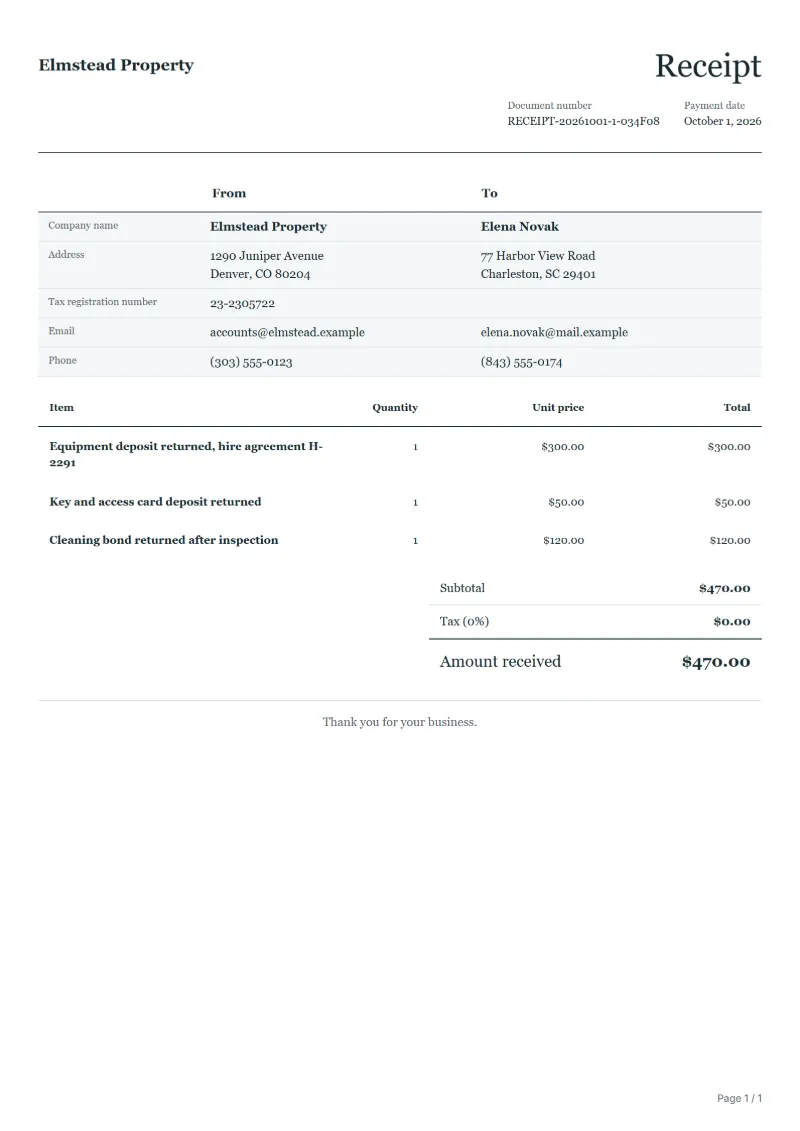
The figures are an example, in dollars. A customer hired a floor saw and paid a $500 equipment deposit, a $50 key deposit and a $120 cleaning bond. On return the blade guard was cracked, and the hire firm keeps $200 for it, as its terms allow.
| Item | Quantity × unit price | Amount |
|---|---|---|
| Equipment deposit returned, hire agreement H-2291 | 1 × $300.00 | $300.00 |
| Key and access card deposit returned | 1 × $50.00 | $50.00 |
| Cleaning bond returned after inspection | 1 × $120.00 | $120.00 |
| Invoice total | $470.00 | |
| Received | $470.00 | |
| Still owed | $0.00 | |
The customer signs for $470.00: $300 of the equipment deposit, plus the key deposit and the cleaning bond in full. The notes give the $500 held, the $200 kept for the guard and the inspection that recorded the damage.
Common mistakes when returning a deposit
- Returning less than was held without listing each deduction and its reason.
- Letting the customer sign before the money has actually reached them.
- Paying the refund to someone other than the payer without written instructions.
- Keeping no inspection notes or photos to back up a deduction.
- Holding the deposit longer than the agreement allows.
What the document must show
These details make a receipt easier to approve and to file.
- Your business name and address, and your tax number if you are registered
- Receipt number and issue date (the date the payment arrived)
- Who paid
- How they paid: bank transfer, card or cash
- What the payment is for, and the number of the invoice it settles
- The amount received, with any tax it includes shown separately
- For a part payment, the balance still owed
The sales tax depends on where the work is supplied, so set the rate that applies to your customer before sending.
Official rate reference: US government: state and local taxes
Frequently asked questions
Who signs a deposit refund receipt?
The person who receives the money back, or someone they authorised in writing. The business prepares it and keeps the signed copy as proof that the deposit was returned.
How do I show a deduction from the deposit?
Write the deposit held and each deduction with its reason in the notes, and enter only what you actually return on the lines. The amount on the receipt then matches the money handed over.
Can I refund to a different person or account?
Only with the payer’s written instruction. Otherwise return the deposit the way it was paid, to the person who paid it, and say so on the receipt.
The customer disagrees with a deduction. What goes on the receipt?
Return the undisputed part, receipt that amount and note the disputed sum separately. If the customer asks, add that signing does not mean they accept the deduction.
How do I book an amount I kept for damage?
Whether a deduction counts as compensation or as a charge for your service is a question for your tax adviser. This receipt records only what was handed back.
How is tax calculated on this template?
The sales tax depends on where the work is supplied, so set the rate that applies to your customer before sending. The editor keeps the net amount, the tax and the total apart, and recalculates all three when you change a quantity, a unit price or the country setting.
Can I add my logo and signature?
Yes. The From section of the editor has a place for your company logo and for a signature or seal image. Uploading a picture needs a free account, and a member can keep both in settings so that every new document starts with them.
Read next
Reading for the Deposit refund receipt template: What a receipt must show (and receipt vs invoice) and Quote, proforma, invoice, receipt, credit note: which to use. To add tax or check a total, use the VAT and GST calculator.