3D rendering invoice template
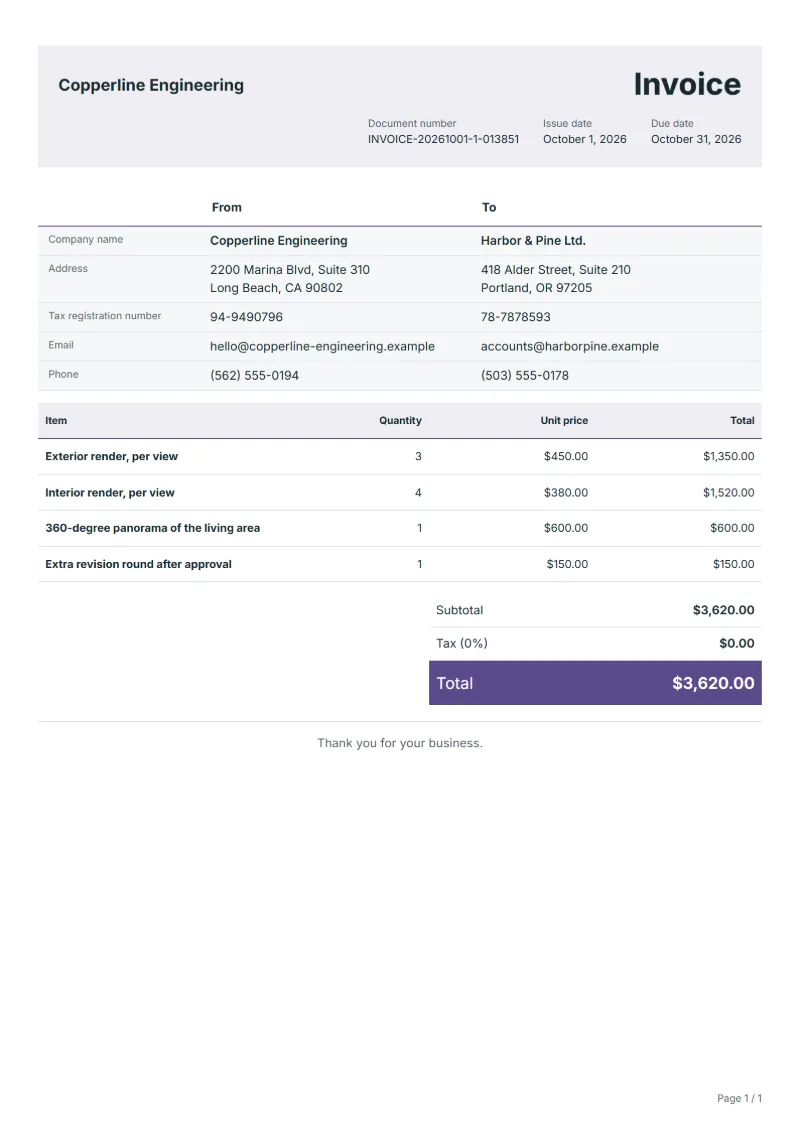
3D rendering invoice template for architectural visualisation: exterior and interior views, a 360-degree panorama and paid revisions, each on its own line.
Templates by industry
- Exterior render, per view
- Interior render, per view
- 360-degree panorama of the living area
- Extra revision round after approval
Preparation guide
Example workflow
Confirm scope and quantities
Example: reconcile the approval and work record for "Exterior render, per view" to establish the quantity for this invoice.
Record delivery and acceptance
Check completion for every line, including "Extra revision round after approval". Hand over approved versions and a file manifest, confirming usage scope and completed revisions.
Send the billing record
Send the final charges, delivery reference and due date to the customer, then reconcile payment against the invoice number.
Architectural renders are sold by the view. A developer marketing flats might buy three street views, four interiors and a panorama for the sales website, and every view needs its own camera set-up, lighting and post-production. This template prices views one by one, keeps the panorama apart because it is produced very differently, and bills a change after approval as a separate round, which is where most arguments about rendering invoices begin.
Fields to prepare
- Deliverables and line items
- Exterior render, per view, Interior render, per view, 360-degree panorama of the living area, Extra revision round after approval: record the quantities actually supplied and the service period.
- Exterior render, per view
- Give each exterior view a short name such as street corner at dusk, so the client can match it to the file.
- Interior render, per view
- Say whether furniture and decor came from the interior designer's list or were chosen by you.
- 360-degree panorama of the living area
- Bill the panorama with its delivery format, for example an equirectangular image or a link to a hosted viewer.
- Extra revision round after approval
- Describe what changed in the extra round and which approval it came after.
- Quantity and output format
- Record pages, images, word counts or running time, final file formats and whether editable source files are included.
- Review and usage scope
- Specify the draft approver, revision rounds, intended media and duration, and who supplies third-party assets.
- Scope to agree
- Price each view on its own, state the output resolution and the correction rounds included, and record the drawing revision the model was built from.
Before sending
- Does “Exterior render, per view” show the quantity actually supplied, not the quantity first quoted?
- Is “Interior render, per view” charged at the rate the customer agreed to, with any change approved?
- Is “360-degree panorama of the living area” finished and accepted, or does it belong on a later invoice?
Show 4 more
- Does “Extra revision round after approval” show the quantity actually supplied, not the quantity first quoted?
- Agree when a change of direction after draft approval becomes additional work.
- Check separately whether editable sources and final delivery files are included.
- Match completed work to the order or approval record, and confirm the payment due date and amounts already received.
Worked example with sample figures
The figures below are invented to show how the template adds up: 4 lines in USD, with an example tax rate of 8%.
| Item | Quantity × unit price | Amount |
|---|---|---|
| Exterior render, per view | 3 × $450.00 | $1,350.00 |
| Interior render, per view | 4 × $380.00 | $1,520.00 |
| 360-degree panorama of the living area | 1 × $600.00 | $600.00 |
| Extra revision round after approval | 1 × $150.00 | $150.00 |
| Subtotal | $3,620.00 | |
| Sales tax (8%) | $289.60 | |
| Total | $3,909.60 | |
Net amount $3,620.00, sales tax $289.60, total payable $3,909.60.
What the document must show
The details an invoice has to show, and why each one matters, are set out in the guide below.
The sales tax depends on where the work is supplied, so set the rate that applies to your customer before sending.
Official rate reference: US government: state and local taxes
Full requirements: How to write an invoice: a step-by-step example
Frequently asked questions
The architect changed the facade after I started. Who pays?
Changes made after you received the final drawings are extra work. Bill them as a revision line and name the drawing revision that caused them, so the client can pass the cost to whoever made the change.
Should the 3D model be a separate line?
Only when the client receives the model file or may reuse it. If the model only serves your images, its cost belongs inside the price of each view.
How is the sales tax worked out on this invoice?
The worked example above uses an example rate of 8%: $289.60 on a net amount of $3,620.00, for a total of $3,909.60. The editor recalculates all three when you change a quantity, a price or the country.
How should I number invoices?
Use one unbroken sequence per business, never reuse a number, and issue a credit note rather than deleting an invoice you have already sent.
Can I add my logo and signature?
Yes. The From section of the editor has a place for your company logo and for a signature or seal image. Uploading a picture needs a free account, and a member can keep both in settings so that every new document starts with them.
Read next
Reading for the 3D rendering invoice template: How to write an invoice: a step-by-step example and Invoice numbering: sequences and corrections. The VAT and GST calculator works out the tax line for you.