Shipping refund credit note template
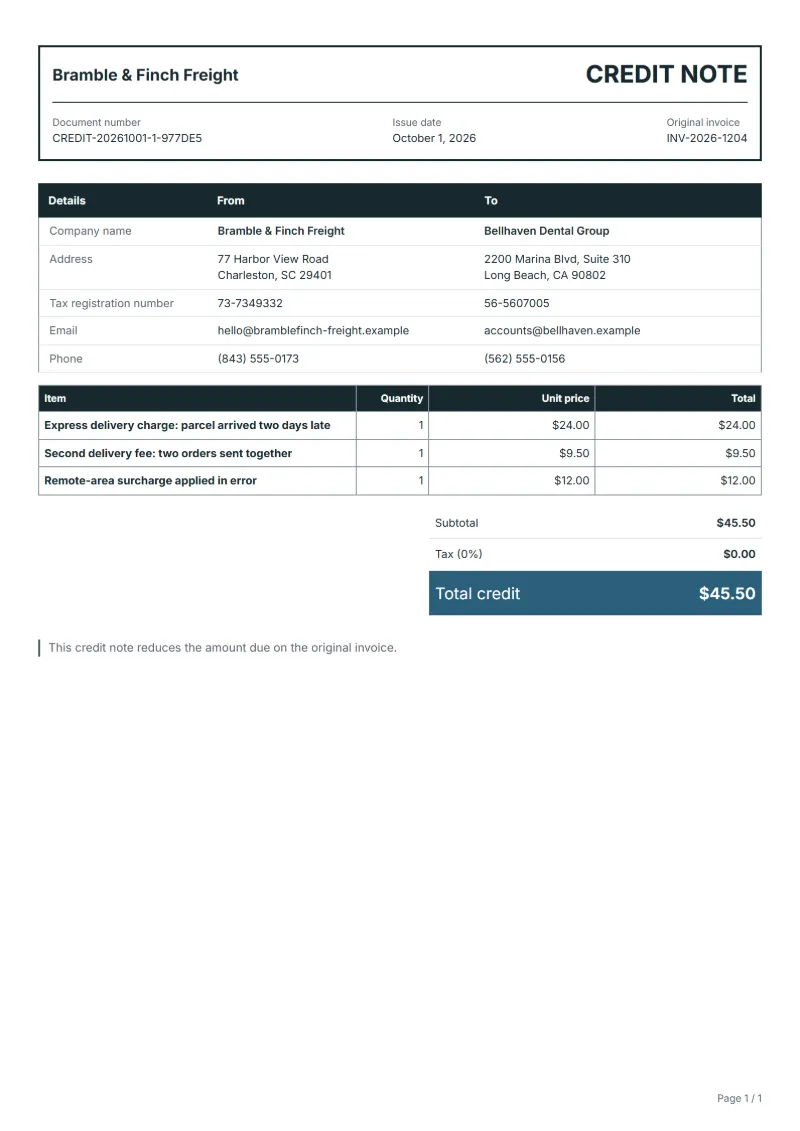
Shipping refund credit note template: return an express charge that was not met, a second delivery fee for orders sent together or a surcharge billed in error.
Templates by industry
- Express delivery charge: parcel arrived two days late
- Second delivery fee: two orders sent together
- Remote-area surcharge applied in error
Preparation guide
Example workflow
Identify the invoice and the reason
Example: for "Express delivery charge: parcel arrived two days late", find the original invoice, note its number and date, and record the reason: a return, a price reduction or a cancellation.
Credit the affected lines
Enter the quantity or amount credited for each affected line, down to "Remote-area surcharge applied in error", so the tax on it is reversed in proportion.
Send and settle the credit
Send the credit note to the customer, then refund the amount or set it off against the next invoice, and keep both documents together.
Delivery charges are refunded more often than goods. A customer paid for next-day delivery and waited three days, two orders placed an hour apart left in one parcel, or the checkout added a surcharge for an address that does not qualify. This credit note returns only the shipping part of the original invoice, with the order number and the reason on each line, so the goods stay invoiced as they were and the customer sees exactly why money is coming back.
Fields to prepare
- Deliverables and line items
- Express delivery charge: parcel arrived two days late, Second delivery fee: two orders sent together, Remote-area surcharge applied in error: only the lines being reduced or cancelled, with the quantity or amount credited.
- Express delivery charge: parcel arrived two days late
- Give the promised and the actual delivery date; a carrier’s tracking record settles most questions.
- Second delivery fee: two orders sent together
- When two orders travel in one parcel, refund the second shipping charge and name both order numbers.
- Remote-area surcharge applied in error
- A surcharge applied in error should also be fixed in the checkout or rate table, or the same refund follows next week.
- Original invoice
- Quote the number and date of the invoice being corrected, and the reason: a return, a price reduction or a cancellation.
- Settlement
- Say how the credit is settled: refunded to the customer or set off against the next invoice.
- Scope to agree
- Name the order and the delivery charge being refunded, give the reason in one line, such as a missed express date or orders shipped together, and leave the goods untouched.
Before sending
- Is “Express delivery charge: parcel arrived two days late” one of the lines being corrected, at the price on the original invoice?
- Is the quantity or amount credited for “Second delivery fee: two orders sent together” no more than was invoiced?
- Does the customer know why “Remote-area surcharge applied in error” is credited: a return, a price change or a cancellation?
Show 3 more
- Credit only the affected lines, and reverse the tax on them at the rate the original invoice used.
- Give the credit note a number of its own rather than reusing or changing the original invoice number.
- Agree with the customer whether the credit is refunded or set off before you send it.
Worked example with sample figures
The figures below are invented to show how the template adds up: 3 lines in USD, with an example tax rate of 8%.
| Item | Quantity × unit price | Amount |
|---|---|---|
| Express delivery charge: parcel arrived two days late | 1 × $24.00 | $24.00 |
| Second delivery fee: two orders sent together | 1 × $9.50 | $9.50 |
| Remote-area surcharge applied in error | 1 × $12.00 | $12.00 |
| Subtotal | $45.50 | |
| Sales tax (8%) | $3.64 | |
| Total | $49.14 | |
Credit before tax $45.50, sales tax reversed $3.64, total credited $49.14.
- The credit corrects invoice INV-2026-1204.
What the document must show
The details a credit note has to show, and why each one matters, are set out in the guide below.
The sales tax depends on where the work is supplied, so set the rate that applies to your customer before sending.
Official rate reference: US government: state and local taxes
Full requirements: Credit note vs invoice (and credit memo): how to issue one
Frequently asked questions
Should the refunded shipping include tax?
If tax was charged on the delivery charge, credit it in proportion with the charge, as on any credit note. In many systems delivery follows the tax rate of the goods it carries, so a mixed order may need the rate checked per line.
The carrier caused the delay. Do I still refund?
Your promise to the customer decides, not who caused the delay. Refund under your terms and claim from the carrier separately under its own conditions.
How is the sales tax worked out on this credit note?
The worked example above uses an example rate of 8%: $3.64 on a net amount of $45.50, for a total of $49.14. The editor recalculates all three when you change a quantity, a price or the country.
Can I download it as Excel, Word or PDF?
Yes. A PDF needs no account: fill in the template and use Print / PDF. The Excel and Word files download from this page with a free account, and the spreadsheet keeps its formulas, so changing a quantity updates the tax and the total.
Can I change the layout and colour?
Yes. The editor offers other layouts and a document colour for the printed page. Changing them moves no figure: the lines and totals stay as they are, and the PDF, Word and Excel files follow the layout you pick.
Read next
Reading for the Shipping refund credit note template: Credit note vs invoice (and credit memo): how to issue one and Invoice numbering: sequences and corrections. The VAT and GST calculator helps you credit the tax that went with the goods.