Repair receipt template
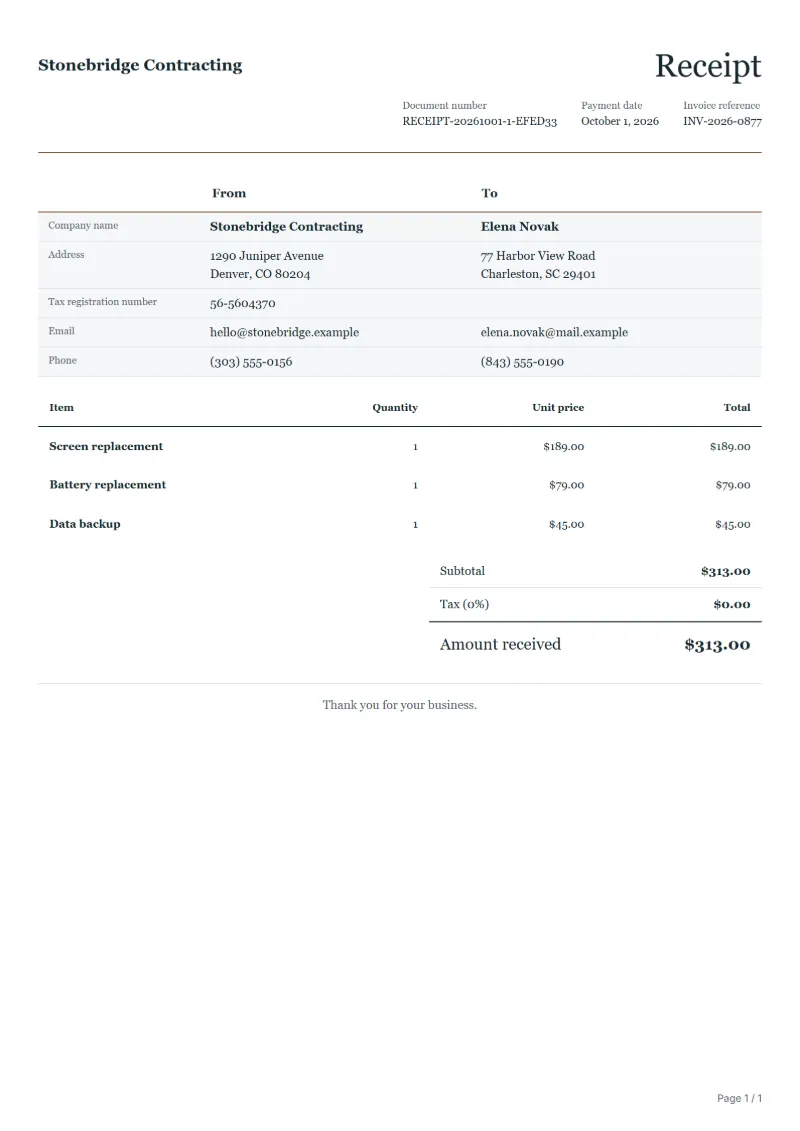
Repair receipt template for phone, computer and appliance repairs: the device, the fault, parts replaced, the amount paid and the repair warranty.
Templates by industry
- Screen replacement
- Battery replacement
- Data backup
Preparation guide
Example workflow
Match the payment to the invoice
Example: check the payment for "Screen replacement" against the invoice it settles: the invoice number, the amount received and any balance still owed.
Record the payment
Enter the payment date, the payment method and the amount received, and check each line this payment covers, down to "Data backup".
Send the receipt
Send the receipt to the customer and mark the invoice as paid; if a balance remains, keep the invoice open for it.
Phone, laptop and appliance repair shops hand over this receipt when the customer collects the device and pays. Beyond the amount, it is the customer’s record of what was done to one specific device, so it carries the model and serial number, the fault reported and the parts fitted. The repair warranty rests on that record: if the same screen fails next month, both sides can see whether it was the part you fitted or a new crack.
Fields to prepare
- Deliverables and line items
- Screen replacement, Battery replacement, Data backup: the lines this payment covers, as they appear on the invoice it settles.
- Screen replacement
- Say whether the screen is an original part or a compatible one, since the quality and the warranty you offer often differ.
- Battery replacement
- Note the new battery’s capacity or part number, and whether the old battery was disposed of safely or returned.
- Data backup
- Record where the backup was copied to and that your shop copy was deleted after handover, since it holds the customer’s personal data.
- Payment details
- Record the payment date, the method (bank transfer, card or cash) and the amount received, exactly as it arrived.
- Invoice reference
- Quote the number of the invoice this payment settles; for a part payment, note the balance still owed.
- Scope to agree
- Record the device model and serial number, the fault reported, the parts fitted and how long the repair is guaranteed.
Before sending
- Does “Screen replacement” match the line on the invoice this payment settles?
- Has the money for “Battery replacement” actually arrived, in full or in part?
- Is “Data backup” shown at the amount received, with any balance still owed noted?
Show 3 more
- Confirm the money has actually arrived before you issue the receipt.
- Check that the amount received matches the invoice, and note any difference as a balance or an overpayment.
- Quote the invoice number it settles, and keep receipt numbers in a sequence of their own.
Worked example with sample figures
The figures below are invented to show how the template adds up: 3 lines in USD, with an example tax rate of 8%.
| Item | Quantity × unit price | Amount |
|---|---|---|
| Screen replacement | 1 × $189.00 | $189.00 |
| Battery replacement | 1 × $79.00 | $79.00 |
| Data backup | 1 × $45.00 | $45.00 |
| Subtotal | $313.00 | |
| Sales tax (8%) | $25.04 | |
| Total | $338.04 | |
Amount received $338.04, of which sales tax $25.04.
- The payment settles invoice INV-2026-0877.
What the document must show
The details a receipt has to show, and why each one matters, are set out in the guide below.
The sales tax depends on where the work is supplied, so set the rate that applies to your customer before sending.
Official rate reference: US government: state and local taxes
Full requirements: What a receipt must show (and receipt vs invoice)
Frequently asked questions
What does the repair warranty cover?
Usually the part you fitted and your workmanship for the period you state, not new damage from a drop or water. Write the period and the exclusions on the receipt, so a later claim can be checked against them.
Do I issue a receipt if the device could not be repaired?
Yes, for whatever the customer paid, such as a diagnostic fee. Say on the receipt that the device was returned unrepaired and why, so nobody later assumes a repair warranty applies.
How is the sales tax worked out on this receipt?
The worked example above uses an example rate of 8%: $25.04 on a net amount of $313.00, for a total of $338.04. The editor recalculates all three when you change a quantity, a price or the country.
Can I download it as Excel, Word or PDF?
Yes. A PDF needs no account: fill in the template and use Print / PDF. The Excel and Word files download from this page with a free account, and the spreadsheet keeps its formulas, so changing a quantity updates the tax and the total.
Can I add my logo and signature?
Yes. The From section of the editor has a place for your company logo and for a signature or seal image. Uploading a picture needs a free account, and a member can keep both in settings so that every new document starts with them.
Read next
Reading for the Repair receipt template: What a receipt must show (and receipt vs invoice) and Unpaid invoice: follow-ups, part payments and statements. To add tax or check a total, use the VAT and GST calculator.