Printing quotation
Quotation template for print shops: print file preflight, brochure printing, and binding and trimming. Fill it in online or download Excel or Word.
Templates by industry
- Print file preflight
- Brochure printing
- Binding and trimming
Preparation guide
Example workflow
Confirm scope and quantities
Example: start with "Print file preflight", confirm the required quantity and client inputs, then agree completion criteria for each item.
Review and approve the quotation
Confirm acceptance evidence for "Binding and trimming", all line quantities, exclusions and quote validity with the customer, and retain the approved version.
Deliver and prepare billing
Reconcile delivered quantities with approved specifications and hand over inspection and use or installation records. When the agreed milestone is complete, prepare an invoice using actual quantities and approved changes.
A print quotation fixes a price for one specific job, so every detail that changes the cost belongs on it: number of copies, paper weight and finish, colors, page count, binding and finished size. This template splits checking the customer’s files, the printing itself and the finishing work, which makes it easy to requote a different quantity or binding without rewriting the whole document. The price holds only for the specification written on it, so say that plainly.
Fields to prepare
- Deliverables and line items
- Print file preflight, Brochure printing, Binding and trimming: specify the planned quantity and delivery scope for each item.
- Print file preflight
- Say what the check covers, such as bleed, image resolution and color mode, and that correcting faulty files is charged separately unless included.
- Brochure printing
- Write the run length, page count, paper weight and colors in the description, because each of them changes the price on its own.
- Binding and trimming
- Name the binding method, for example saddle stitch or perfect binding, and the finished trim size after cutting.
- Specification and revision
- Record the approved drawing or file revision, material, dimensions, finish and agreed tolerances.
- Setup and production quantity
- Separate one-time setup from per-unit production and define inspection, packing and transport allowances.
- Scope to agree
- Specify print run, paper stock, colors, binding, trim size and pre-print proof approval.
Before sending
- Does “Print file preflight” say what is included and what quantity the price assumes?
- Would the customer read “Brochure printing” the way you do, including what it leaves out?
- Can you still honour the price of “Binding and trimming” on the last day the quotation is valid?
Show 3 more
- Define the sample or proof that must be approved before production and its approval deadline.
- Distinguish defect and rework handling from the cost of customer specification changes.
- Check quote validity, the customer approval method and payment milestones.
Worked example with sample figures
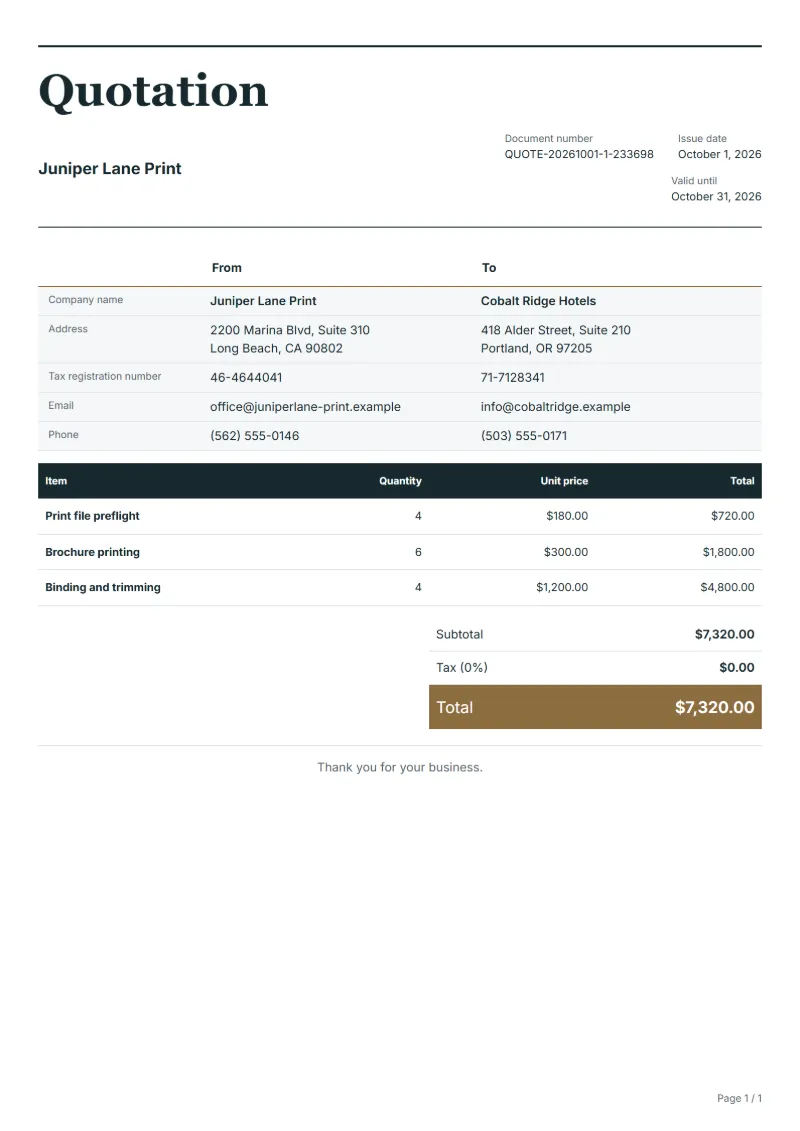
The figures below are invented to show how the template adds up: 3 lines in USD, with an example tax rate of 8%.
| Item | Quantity × unit price | Amount |
|---|---|---|
| Print file preflight | 4 × $180.00 | $720.00 |
| Brochure printing | 6 × $300.00 | $1,800.00 |
| Binding and trimming | 4 × $1,200.00 | $4,800.00 |
| Subtotal | $7,320.00 | |
| Sales tax (8%) | $585.60 | |
| Total | $7,905.60 | |
Quoted net amount $7,320.00, sales tax $585.60, quoted total $7,905.60.
What the document must show
The details a quotation has to show, and why each one matters, are set out in the guide below.
The sales tax depends on where the work is supplied, so set the rate that applies to your customer before sending.
Official rate reference: US government: state and local taxes
Full requirements: How to write a quotation: format, example and checklist
Frequently asked questions
How do I offer prices for two or three quantities?
Keep the quantity the client is most likely to order in the lines and list the prices for the other runs, for example 1,000 and 2,500 copies, in the notes. Entering them as extra lines would add them all to the total and mislead the client.
What happens to the price if the client changes the paper after approving?
The price was for the paper named on the quotation, so send a revised quotation before printing. A different stock changes the cost of the sheets and can change the binding or the postage, so do not absorb it without telling the client.
Should delivery be in the quotation?
Yes, if you deliver. Add a line with the delivery address or the number of drop points and the date, or state that the job is collected from your premises, so the client does not assume delivery comes free.
How is the sales tax worked out on this quotation?
The worked example above uses an example rate of 8%: $585.60 on a net amount of $7,320.00, for a total of $7,905.60. The editor recalculates all three when you change a quantity, a price or the country.
How do I turn an approved quotation into an invoice?
Open the approved quotation and convert it. The original stays unchanged, and the invoice carries the same line items so the customer can match the two documents.
Read next
Reading for the Printing quotation: How to write a quotation: format, example and checklist and Estimate vs quote: what binds you, with a remodeling example. The VAT and GST calculator adds tax to your quoted prices.