Printing purchase order template
Print purchase order template for brochures, business cards and banners: approved artwork and proof, paper and finish, quantities and delivery address.
Templates by industry
- Product brochures
- Business cards
- Roll-up banners
Preparation guide
Example workflow
Match the quotation
Example: take "Product brochures" from the supplier's quotation and copy its quantity, unit price and specification exactly.
Approve and send
Confirm the delivery date and address for every line, including "Roll-up banners", then sign the authorized-by line and send the order.
Receive and reconcile
When the goods arrive, check them against the order, then match the supplier's invoice to the order number before paying.
Marketing teams and agencies send this order to a printer once the proof has been signed off. It turns the quotation into a firm job: quantities, finished sizes, stock and finishing, the artwork version approved and where each batch goes. Because a print run is hard to undo once it is on press, the order is what both sides refer to if colours, quantities or deliveries are questioned later.
Fields to prepare
- Deliverables and line items
- Product brochures, Business cards, Roll-up banners: state the quantity, unit and agreed price for each line, as the supplier quoted it.
- Product brochures
- Give the finished size, page count, paper weight for cover and inside pages, the binding and the quantity.
- Business cards
- Order a set per person, with the number of cards in each box, and attach or name the approved file for every name.
- Roll-up banners
- State the printed size, the stand type and whether a carry bag is included, plus the branch each banner goes to.
- Supplier and quotation
- Name the supplier and quote the number of the quotation this order accepts, so each price can be traced to the offer.
- Delivery
- Give the delivery date, the address the goods go to, the shipping method and who receives them.
- Scope to agree
- State the artwork file and proof approved, the paper stock and finish, the quantity per item, and the delivery address for each batch.
Before sending
- Does “Product brochures” match the supplier’s quotation in specification, quantity and price?
- Are a delivery date and a receiver agreed for “Business cards”?
- Has the budget holder approved the spend on “Roll-up banners”?
Show 3 more
- Check the supplier's quotation number, the delivery date and address, and who approved the order.
- Check that each quantity, unit and unit price matches the supplier's quotation.
- Give the order a number of its own, so the supplier can quote it on the delivery note and the invoice.
Worked example with sample figures
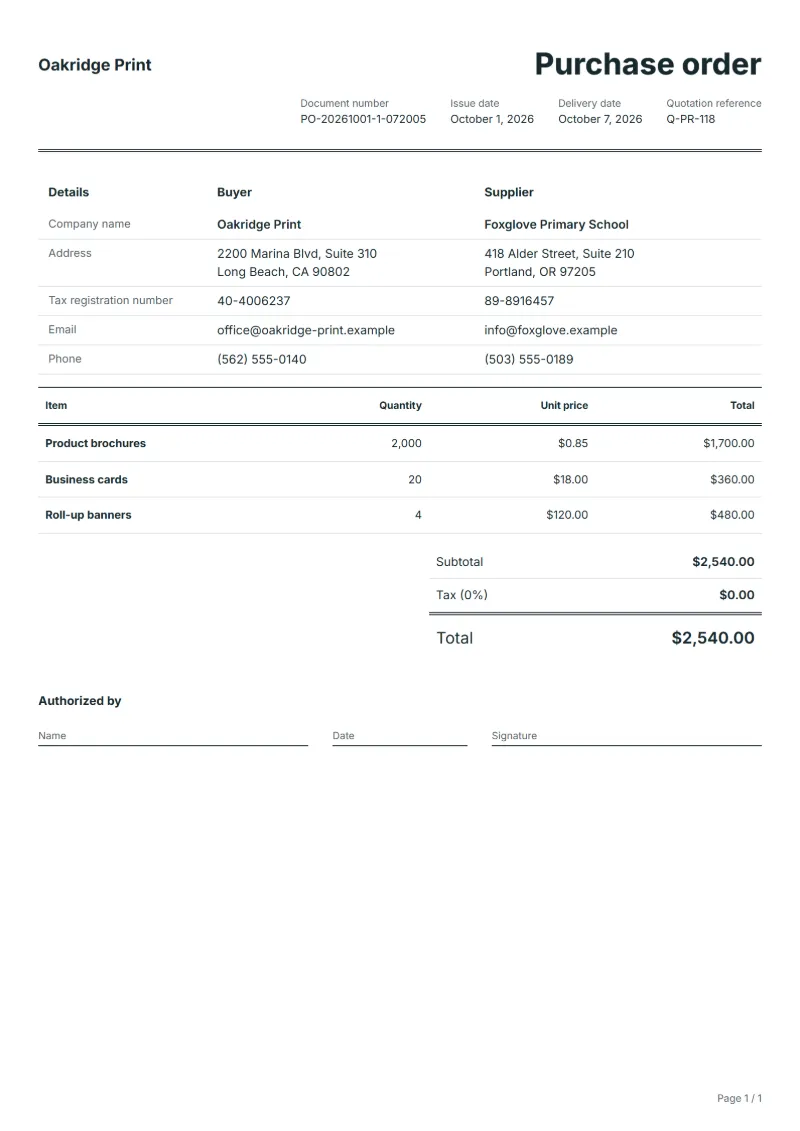
The figures below are invented to show how the template adds up: 3 lines in USD, with an example tax rate of 8%.
| Item | Quantity × unit price | Amount |
|---|---|---|
| Product brochures | 2,000 × $0.85 | $1,700.00 |
| Business cards | 20 × $18.00 | $360.00 |
| Roll-up banners | 4 × $120.00 | $480.00 |
| Subtotal | $2,540.00 | |
| Sales tax (8%) | $203.20 | |
| Total | $2,743.20 | |
Order value $2,540.00, sales tax $203.20, order total $2,743.20.
- The order accepts quotation Q-PR-118.
- Delivery is due 6 days after the order date.
What the document must show
These details make a purchase order easier to approve and to file.
- Your company name and address as the buyer
- The supplier's name and address
- Order number and date
- Each item with quantity, unit price and amount
- Delivery date, delivery address and shipping method
- Payment terms and the total, with tax shown separately
- Who authorized the order
The sales tax depends on where the work is supplied, so set the rate that applies to your customer before sending.
Official rate reference: US government: state and local taxes
Frequently asked questions
The printer delivered more brochures than I ordered. Do I pay for the extra?
Printers commonly work to an over- or under-run allowance stated in their terms and invoice the quantity actually delivered. If you need the exact number, write that on the order before the job is printed.
Which artwork version should the order name?
The file name or version of the proof you approved, with the approval date. If you send a corrected file afterwards, issue a revised order, so that a reprint claim can show which file was meant to be printed.
How do I order one design delivered to several offices?
Keep one line per item with the total quantity and list the addresses and quantities in the notes. Ask the printer for a delivery note per address, so each office can confirm what arrived.
How is the sales tax worked out on this purchase order?
The worked example above uses an example rate of 8%: $203.20 on a net amount of $2,540.00, for a total of $2,743.20. The editor recalculates all three when you change a quantity, a price or the country.
Can I change the layout and colour?
Yes. The editor offers other layouts and a document colour for the printed page. Changing them moves no figure: the lines and totals stay as they are, and the PDF, Word and Excel files follow the layout you pick.
Read next
Reading for the Printing purchase order template: Quote, proforma, invoice, receipt, credit note: which to use and Invoice numbering: sequences and corrections. When the goods arrive, match them to this order with the Delivery note template.