Pest control visit work order template
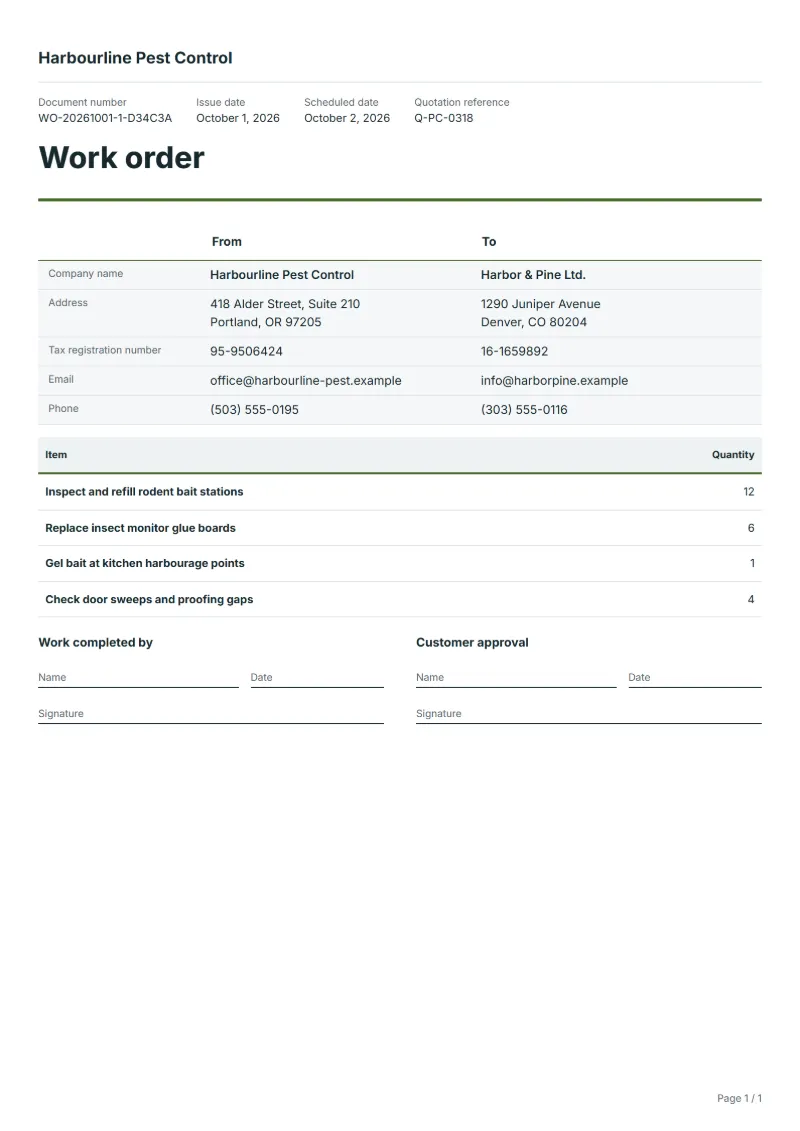
Pest control visit work order template: stations checked, monitors replaced, treatments and proofing checks as counts, with products used and the next visit.
Templates by industry
- Inspect and refill rodent bait stations
- Replace insect monitor glue boards
- Gel bait at kitchen harbourage points
- Check door sweeps and proofing gaps
Preparation guide
Example workflow
Plan the job
Example: start with "Inspect and refill rodent bait stations", set the scheduled date, assign the technician and note how to access the site.
Do the work
Record the time and materials actually used, including "Check door sweeps and proofing gaps", and anything found that needs a separate quote.
Sign off and bill
Have the technician and the customer sign the completion lines, then make the invoice from the work order so the lines carry over.
On a contract site, a pest control visit follows a plan: a set number of bait stations and monitors in known places, checked in the same order each time. This work order turns that plan into a sheet the technician fills in. It lists quantities rather than prices, since the visit is covered by the contract, and leaves room to record activity at each station, the products used and any proofing gap the customer should close. The customer signs it before the technician leaves.
Fields to prepare
- Deliverables and line items
- Inspect and refill rodent bait stations, Replace insect monitor glue boards, Gel bait at kitchen harbourage points, Check door sweeps and proofing gaps: describe the work and materials planned for each line, with the time or quantity expected.
- Inspect and refill rodent bait stations
- Give the number of stations checked out of the total on the plan, and the station numbers that showed activity.
- Replace insect monitor glue boards
- Count the glue boards replaced and note what was caught on each, which shows whether a problem is growing.
- Gel bait at kitchen harbourage points
- Name the product, the amount applied and the places treated, as your records and the product label require.
- Check door sweeps and proofing gaps
- List each gap found by location and who is to close it, so the customer’s maintenance team can act on it.
- Job site and schedule
- Give the job site address, the scheduled date and the person assigned, with any access or safety instructions.
- Time and materials
- Record the hours worked and the materials used on each line, as done rather than as planned.
- Scope to agree
- Number every station and monitor on the site plan, record activity found at each, name the products used with their quantities, and set the date of the follow-up visit.
Before sending
- Is it clear who does “Inspect and refill rodent bait stations”, where and when?
- Are the materials for “Replace insect monitor glue boards” listed and on site before the job starts?
- Is there a sign-off for “Gel bait at kitchen harbourage points” so the time can be invoiced afterwards?
Show 4 more
- Is it clear who does “Check door sweeps and proofing gaps”, where and when?
- Check the job site address, the scheduled date, who is assigned, and any access or safety instructions.
- Agree with the customer which tasks are included, and note anything found on site that needs a separate quote.
- Have the customer check and sign off the work before you make the invoice.
Worked example with sample figures
The quantities below are invented to show how the template is filled in: 4 lines, counted in units, with no prices.
| Item | Quantity |
|---|---|
| Inspect and refill rodent bait stations | 12 |
| Replace insect monitor glue boards | 6 |
| Gel bait at kitchen harbourage points | 1 |
| Check door sweeps and proofing gaps | 4 |
| Total | 23 |
23 units in 4 lines.
- The job follows quotation Q-PC-0318.
- The job is booked for the next day.
What the document must show
These details make a work order easier to approve and to file.
- Work order number and date
- The customer's name and job site address
- Scheduled date and the person assigned
- Each task and the materials needed
- Time or quantity per line, and prices if shown
- Sign-off lines for the worker and the customer
This document prints quantities without prices, so no tax appears on it unless you switch its line columns to prices and totals.
Frequently asked questions
Why does this work order show quantities and no prices?
Contract visits are usually billed monthly under the contract, not per visit. The work order records what was done; extra treatment outside the contract goes on a quotation or invoice of its own.
Where do I record the products I used?
In the notes, with product name, amount and where it was applied, or on a separate treatment record if you keep one; refer to it here so the two can be matched.
Does this work order show prices or tax?
This document prints quantities without prices, so no tax appears on it unless you switch its line columns to prices and totals. The worked example above counts 23 units and nothing else.
How does a work order become an invoice?
When the job is done, open the work order and make an invoice from it. The lines, customer and prices carry over, and the work order stays as the record of what was agreed and done.
How is the document numbered?
QuoteBill gives each new document a unique number of its own. A member can switch to numbers in sequence in settings, such as WO-2026-0001: one sequence for each kind of document, starting again every calendar year. A number you type yourself is kept as it is.
Read next
Reading for the Pest control visit work order template: How to write a statement of work (SOW), with an example and Quote to invoice: how to convert a quote, step by step. When the job is signed off, record it on the Acceptance certificate template.