Patient account statement template
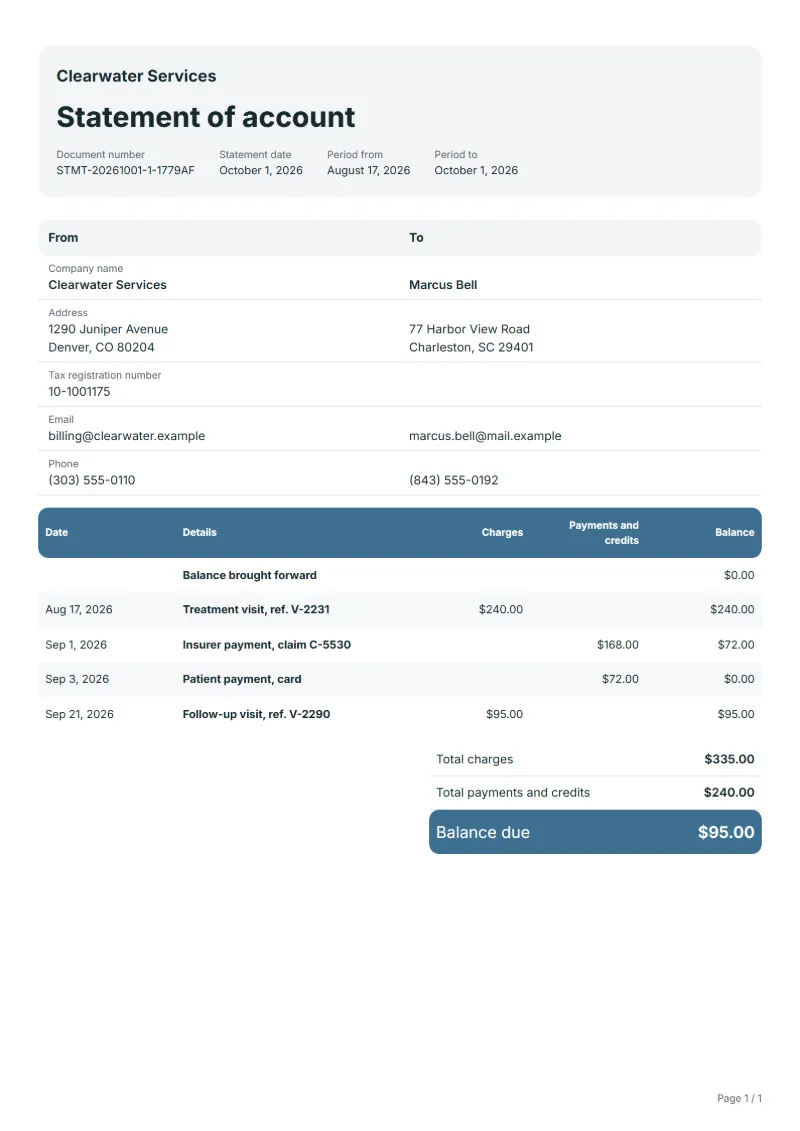
Patient account statement template for clinics and practices: visits by reference, insurer and patient payments, and the patient’s share still due.
Templates by industry
- Treatment visit, ref. V-2231
- Insurer payment, claim C-5530
- Patient payment, card
- Follow-up visit, ref. V-2290
Preparation guide
Example workflow
Collect the period's documents
Example: list "Treatment visit, ref. V-2231" and every other invoice, receipt and credit note for the customer in the period, oldest first.
Check the running balance
Confirm the balance after each line, including "Follow-up visit, ref. V-2290", matches your accounts for this customer.
Send and follow up
Send the statement with the balance due and payment terms, then follow up on invoices past due.
Where a private clinic, a physiotherapy practice or a dental surgery bills the visit first and the insurer pays part of it later, the patient is often left unsure what is still theirs to pay. A patient statement sorts that out: each visit as a charge, the insurer’s payment and the patient’s own payments as credits, and the remaining share. Visits are named by date and reference only, because a statement that travels by post or e-mail should carry no clinical detail.
Fields to prepare
- Deliverables and line items
- Treatment visit, ref. V-2231, Insurer payment, claim C-5530, Patient payment, card, Follow-up visit, ref. V-2290: list each invoice, payment and credit by date, with its document number.
- Treatment visit, ref. V-2231
- Name the visit by its date and reference only; the itemised treatment belongs on the invoice the patient already has.
- Insurer payment, claim C-5530
- Record the insurer’s payment with its claim number, so the patient can match it to the insurer’s own letter.
- Patient payment, card
- Show the patient’s payment with its date and method, separately from the insurer’s.
- Follow-up visit, ref. V-2290
- A follow-up visit billed after the last payment starts the next open amount; give its due date.
- Period and balance brought forward
- Give the statement date and the period it covers, and carry over the balance from the previous statement.
- Charges and payments
- Enter each invoice under charges and each payment or credit note under payments and credits, at the amount on the document itself. "Add from my documents" copies those amounts from your saved documents for this customer.
- Scope to agree
- Identify each visit by date and reference rather than by diagnosis, show what the insurer paid and what the patient paid, and state the patient’s share still open.
Before sending
- Does “Treatment visit, ref. V-2231” carry the number and amount of the document it comes from?
- Has every payment for “Insurer payment, claim C-5530” been entered on the day it arrived?
- Would the customer find “Patient payment, card” in their own ledger at the same amount?
Show 4 more
- Does “Follow-up visit, ref. V-2290” carry the number and amount of the document it comes from?
- Check the statement period, the balance brought forward and that every payment received is listed.
- List each invoice once, at the total it was issued for, and each credit note with the payments.
- Say how the customer can pay the balance due, and quote the numbers of any invoices past due.
Worked example with sample figures
The entries below are invented to show how the balance runs: 4 entries in USD over a period of 45 days.
- 45 days before the statement date: Treatment visit, ref. V-2231, charged $240.00; balance $240.00
- 30 days before the statement date: Insurer payment, claim C-5530, paid $168.00; balance $72.00
- 28 days before the statement date: Patient payment, card, paid $72.00; balance $0.00
- 10 days before the statement date: Follow-up visit, ref. V-2290, charged $95.00; balance $95.00
Balance due at the end of the period: $95.00.
What the document must show
These details make a statement of account easier to approve and to file.
- Your company name and address
- The customer's name
- Statement date and period
- Balance brought forward
- Each invoice, payment and credit with date and number
- Running balance and balance due
A statement adds no tax of its own: each line carries an invoice, a payment or a credit at the amount on that document, and the balance runs on from the balance brought forward.
Frequently asked questions
What patient information may the statement show?
Keep it to what billing needs: name, address, visit dates, references and amounts. Health data is protected in most countries; check the privacy rules that apply to your practice before adding anything more.
The insurer paid less than expected. Who pays the rest?
That depends on the patient’s policy and on any agreement your practice has with the insurer. Show the insurer’s payment as received and the remaining share, and explain the difference only as far as the insurer’s letter does.
How is the balance on this statement worked out?
A statement adds no tax of its own: each line carries an invoice, a payment or a credit at the amount on that document, and the balance runs on from the balance brought forward. In the worked example above the entries end at a balance of $95.00.
What is the difference between a statement and an invoice?
An invoice asks for payment for one sale. A statement lists invoices, payments and credits over a period and shows what is still owed; it does not replace the invoices.
Can I change the layout and colour?
Yes. The editor offers other layouts and a document colour for the printed page. Changing them moves no figure: the lines and totals stay as they are, and the PDF, Word and Excel files follow the layout you pick.
Read next
Reading for the Patient account statement template: Unpaid invoice: follow-ups, part payments and statements and Invoice payment terms: Net 15, Net 30, due dates. For an account that is overdue, the Payment reminder template is the next step.