IT equipment delivery note template
IT equipment delivery note template: computers, monitors and switches by serial number and asset tag, where each one was placed, and a received-by line.
Templates by industry
- Desktop computers
- Monitors
- Network switches
Preparation guide
Example workflow
Pick and pack
Example: count "Desktop computers" and the other lines against the order, and note anything that ships later.
Ship with the note
Put the note in or on the shipment with the tracking number and package count, and check "Network switches" is listed.
Get it signed
Ask the recipient to sign and date the received-by line, and keep the signed copy as proof of delivery.
Resellers and IT teams use this note when a batch of computers, screens and network kit is delivered to an office, often in dozens of boxes on one pallet. Counting boxes is not enough here: the note ties each unit’s serial number to its asset tag and the desk or room it went to, so the asset register can be updated from the signed copy. It also shows whether the kit was left boxed or unpacked and placed, which changes what the person signing has checked.
Fields to prepare
- Deliverables and line items
- Desktop computers, Monitors, Network switches: record the quantity actually shipped for each line; prices stay off the note.
- Desktop computers
- Attach the serial list and give each unit’s asset tag and desk number, so a missing machine can be traced to a box rather than a guess.
- Monitors
- Count monitors per desk as well as in total, and say whether stands and cables are inside each box or delivered separately.
- Network switches
- Record the rack or cabinet each switch went to and whether it was mounted or left boxed for the network installer.
- Order and delivery
- Quote the order or invoice number the delivery belongs to, the delivery date and the address the goods go to.
- Shipment
- Give the number of packages, the carrier or shipping method and the tracking number.
- Scope to agree
- List the serial number of each unit, the asset tag applied, and the room or desk each device was delivered to.
Before sending
- Was “Desktop computers” counted when it was packed, and does the count match the order?
- If “Monitors” ships short, does the note say how many follow and when?
- Will the receiver be able to check “Network switches” against this note on arrival?
Show 3 more
- Check the delivery address, the number of packages and the order or invoice number the delivery belongs to.
- Count each line against the order, and list anything that ships later rather than leaving it off.
- Leave prices off the note unless the customer asks for them; they belong on the invoice.
Worked example with sample figures
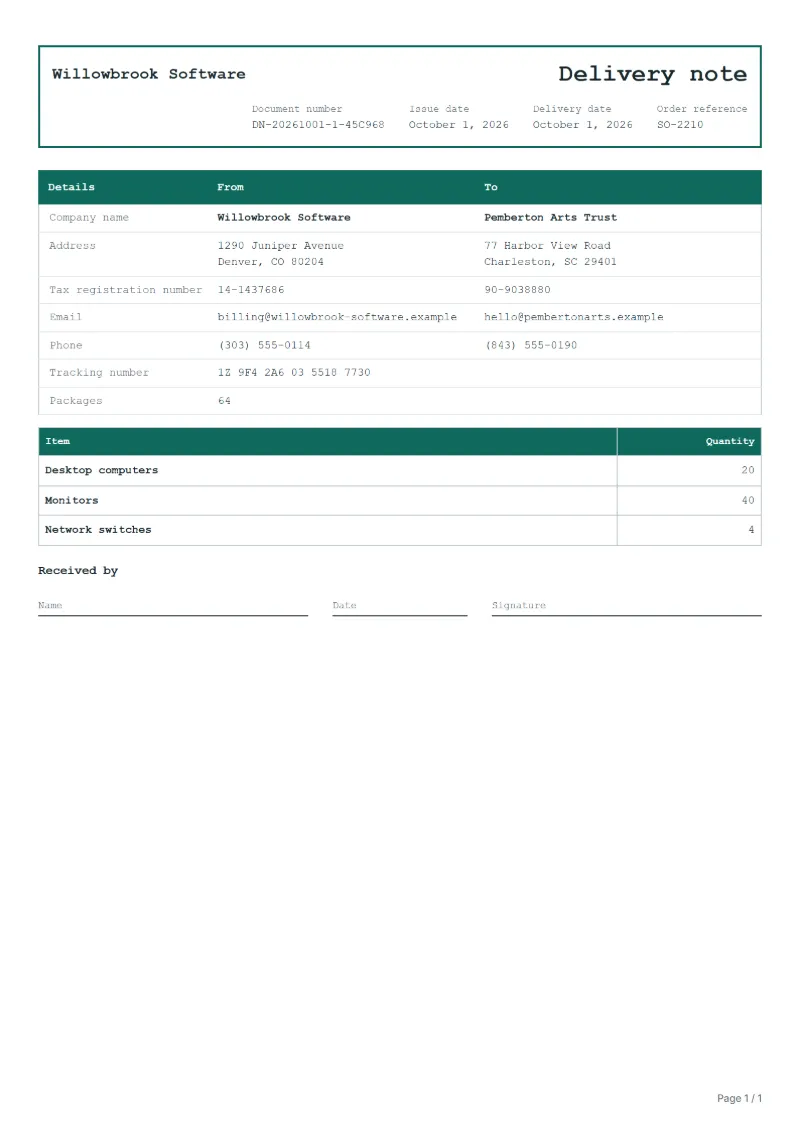
The quantities below are invented to show how the template is filled in: 3 lines, counted in units, with no prices.
| Item | Quantity |
|---|---|
| Desktop computers | 20 |
| Monitors | 40 |
| Network switches | 4 |
| Total | 64 |
64 units in 3 lines.
- The goods ship against sales order SO-2210.
- Packages: 64.
- Tracking number: 1Z 9F4 2A6 03 5518 7730.
What the document must show
These details make a delivery note easier to approve and to file.
- Your company name and address
- The customer's name and delivery address
- Note number and delivery date
- The order or invoice it belongs to
- Each item with the quantity delivered
- Packages and carrier or tracking number
- A line for the recipient's signature and date
This document prints quantities without prices, so no tax appears on it unless you switch its line columns to prices and totals.
Frequently asked questions
Fewer boxes arrived than the package count on the note. What now?
Count the packages before anyone signs, write the shortfall on both copies and keep the tracking number. The supplier can then trace the missing boxes with the carrier, and your asset register is updated only for the units that actually arrived.
Reception signed for the pallet. Is that enough?
It proves the pallet arrived, not that the serial numbers match. If someone other than the IT contact signs, mark the note as packages counted, contents unchecked, and have the IT contact check serials and sign a second line once the boxes are open.
Who takes the packaging away?
Say so on the note: whether the delivery team removes cartons and foam or leaves them for the building’s recycling. On a large rollout this is usually agreed in advance, because dozens of boxes can block a floor for days.
Does this delivery note show prices or tax?
This document prints quantities without prices, so no tax appears on it unless you switch its line columns to prices and totals. The worked example above counts 64 units and nothing else.
Can I add my logo and signature?
Yes. The From section of the editor has a place for your company logo and for a signature or seal image. Uploading a picture needs a free account, and a member can keep both in settings so that every new document starts with them.
Read next
Reading for the IT equipment delivery note template: Quote, proforma, invoice, receipt, credit note: which to use and Estimate vs quote: what binds you, with a remodeling example. The order this delivery answers is written on the Purchase order template.