HVAC service work order template
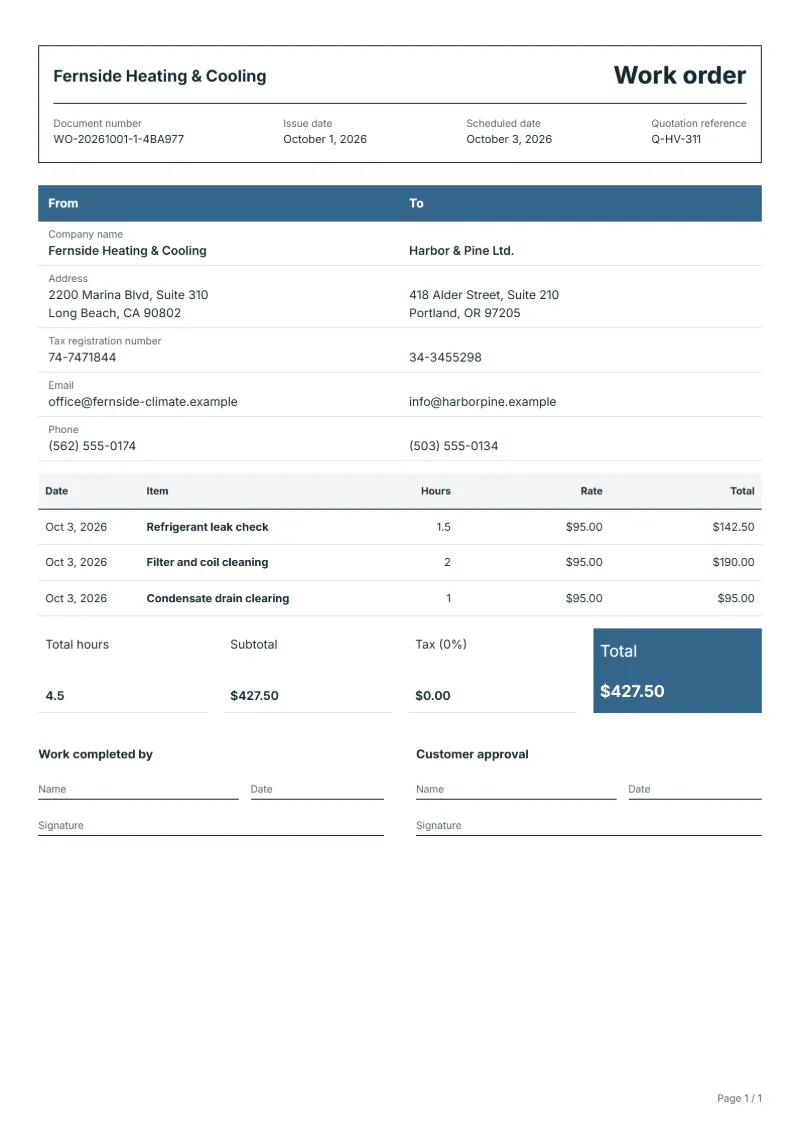
HVAC service work order template: the unit make, model and serial number, tasks by the hour, readings before and after, and sign-off by technician and customer.
Templates by industry
- Refrigerant leak check
- Filter and coil cleaning
- Condensate drain clearing
Preparation guide
Example workflow
Plan the job
Example: start with "Refrigerant leak check", set the scheduled date, assign the technician and note how to access the site.
Do the work
Record the time and materials actually used, including "Condensate drain clearing", and anything found that needs a separate quote.
Sign off and bill
Have the technician and the customer sign the completion lines, then make the invoice from the work order so the lines carry over.
An HVAC service work order tells a technician which unit to service and what to check, and records what the unit measured before and after. For a property manager it is the history of the system: when the filters were cleaned, whether refrigerant was found leaking and which part is waiting for approval. This template books each task by the hour and leaves room for the readings, so the next visit can start where the last one ended.
Fields to prepare
- Deliverables and line items
- Refrigerant leak check, Filter and coil cleaning, Condensate drain clearing: describe the work and materials planned for each line, with the time or quantity expected.
- Refrigerant leak check
- Record the detection method and the result for each joint checked; a leak found here usually leads to a separate repair quotation.
- Filter and coil cleaning
- Note the filter size and whether it was cleaned or replaced, so the next visit brings the right spare.
- Condensate drain clearing
- Say where the blockage was and how it was cleared, and check the drain pan for overflow damage while you are there.
- Job site and schedule
- Give the job site address, the scheduled date and the person assigned, with any access or safety instructions.
- Time and materials
- Record the hours worked and the materials used on each line, as done rather than as planned.
- Scope to agree
- Record the unit's make, model and serial number, the readings before and after service, and any part that needs approval before it is replaced.
Before sending
- Is it clear who does “Refrigerant leak check”, where and when?
- Are the materials for “Filter and coil cleaning” listed and on site before the job starts?
- Is there a sign-off for “Condensate drain clearing” so the time can be invoiced afterwards?
Show 3 more
- Check the job site address, the scheduled date, who is assigned, and any access or safety instructions.
- Agree with the customer which tasks are included, and note anything found on site that needs a separate quote.
- Have the customer check and sign off the work before you make the invoice.
Worked example with sample figures
The figures below are invented to show how the template adds up: 3 lines in USD, with an example tax rate of 8%.
| Item | Hours × rate | Amount |
|---|---|---|
| Refrigerant leak check | 1.5 × $95.00 | $142.50 |
| Filter and coil cleaning | 2 × $95.00 | $190.00 |
| Condensate drain clearing | 1 × $95.00 | $95.00 |
| Subtotal | $427.50 | |
| Sales tax (8%) | $34.20 | |
| Total | $461.70 | |
Planned work $427.50 before tax, $461.70 with sales tax.
- Hours in total: 4.5.
- The job follows quotation Q-HV-311.
- The job is booked 2 days ahead.
What the document must show
These details make a work order easier to approve and to file.
- Work order number and date
- The customer's name and job site address
- Scheduled date and the person assigned
- Each task and the materials needed
- Time or quantity per line, and prices if shown
- Sign-off lines for the worker and the customer
The sales tax depends on where the work is supplied, so set the rate that applies to your customer before sending.
Official rate reference: US government: state and local taxes
Frequently asked questions
Who signs the work order at the end of the visit?
The technician and the person who let them in, usually the site manager or the tenant. Their signature confirms the hours and that the unit was left running.
Can a refrigerant top-up go on this work order?
Only as a line of its own with the amount added, and in many countries only by a certified technician. Note it so the leak behind it is not forgotten.
How is the sales tax worked out on this work order?
The worked example above uses an example rate of 8%: $34.20 on a net amount of $427.50, for a total of $461.70. The editor recalculates all three when you change a quantity, a price or the country.
Can I change the layout and colour?
Yes. The editor offers other layouts and a document colour for the printed page. Changing them moves no figure: the lines and totals stay as they are, and the PDF, Word and Excel files follow the layout you pick.
How is the document numbered?
QuoteBill gives each new document a unique number of its own. A member can switch to numbers in sequence in settings, such as WO-2026-0001: one sequence for each kind of document, starting again every calendar year. A number you type yourself is kept as it is.
Read next
Reading for the HVAC service work order template: How to write a statement of work (SOW), with an example and Quote to invoice: how to convert a quote, step by step. When the job is signed off, record it on the Acceptance certificate template.