Fleet car wash invoice template
Fleet car wash invoice template: a month of washes by vehicle class, interior valets and out-of-hours surcharges, backed by a log of registrations.
Templates by industry
- Exterior wash, small van
- Exterior wash, 3.5 t panel van
- Interior valet, cab only
- Surcharge for washes outside agreed hours
Preparation guide
Example workflow
Confirm scope and quantities
Example: reconcile the approval and work record for "Exterior wash, small van" to establish the quantity for this invoice.
Record delivery and acceptance
Check completion for every line, including "Surcharge for washes outside agreed hours". Deliver the service record, materials used, unresolved issues and the agreed next visit date.
Send the billing record
Send the final charges, delivery reference and due date to the customer, then reconcile payment against the invoice number.
Washing a company’s vans is a running account, not a series of single sales. Drivers turn up through the month, and the fleet manager receives one invoice at the end of it. This template totals the washes by vehicle class, because a panel van takes longer to wash than a small car, adds interior valets and any out-of-hours surcharge, and refers to a wash log with each registration and date. Fleet managers check that log against their own records before they approve payment.
Fields to prepare
- Deliverables and line items
- Exterior wash, small van, Exterior wash, 3.5 t panel van, Interior valet, cab only, Surcharge for washes outside agreed hours: record the quantities actually supplied and the service period.
- Exterior wash, small van
- Define the vehicle classes as your price list does and count the washes per class from the log, not from memory.
- Exterior wash, 3.5 t panel van
- Keep larger vans on their own line; a mixed fleet billed at one rate is the first thing a fleet manager queries.
- Interior valet, cab only
- Say what an interior valet covers, cab only or the load area too, so drivers know what to expect.
- Surcharge for washes outside agreed hours
- Note the times the surcharge applied to, such as before 7 a.m., and which washes they were.
- Assets and visits
- Record the asset or area, visit dates, visit count and access arrangements.
- Labor and materials used
- Separate labor hours, quantities of parts or consumables, and work outside the recurring scope.
- Scope to agree
- Price each vehicle class separately, keep a wash log with registration and date behind the invoice, and quote the fleet customer’s order number or cost centre.
Before sending
- Does “Exterior wash, small van” show the quantity actually supplied, not the quantity first quoted?
- Is “Exterior wash, 3.5 t panel van” charged at the rate the customer agreed to, with any change approved?
- Is “Interior valet, cab only” finished and accepted, or does it belong on a later invoice?
Show 4 more
- Does “Surcharge for washes outside agreed hours” show the quantity actually supplied, not the quantity first quoted?
- Match extra parts and return-visit charges to approved work.
- Record the initial condition and the post-service checks.
- Match completed work to the order or approval record, and confirm the payment due date and amounts already received.
Worked example with sample figures
The figures below are invented to show how the template adds up: 4 lines in USD, with an example tax rate of 8%.
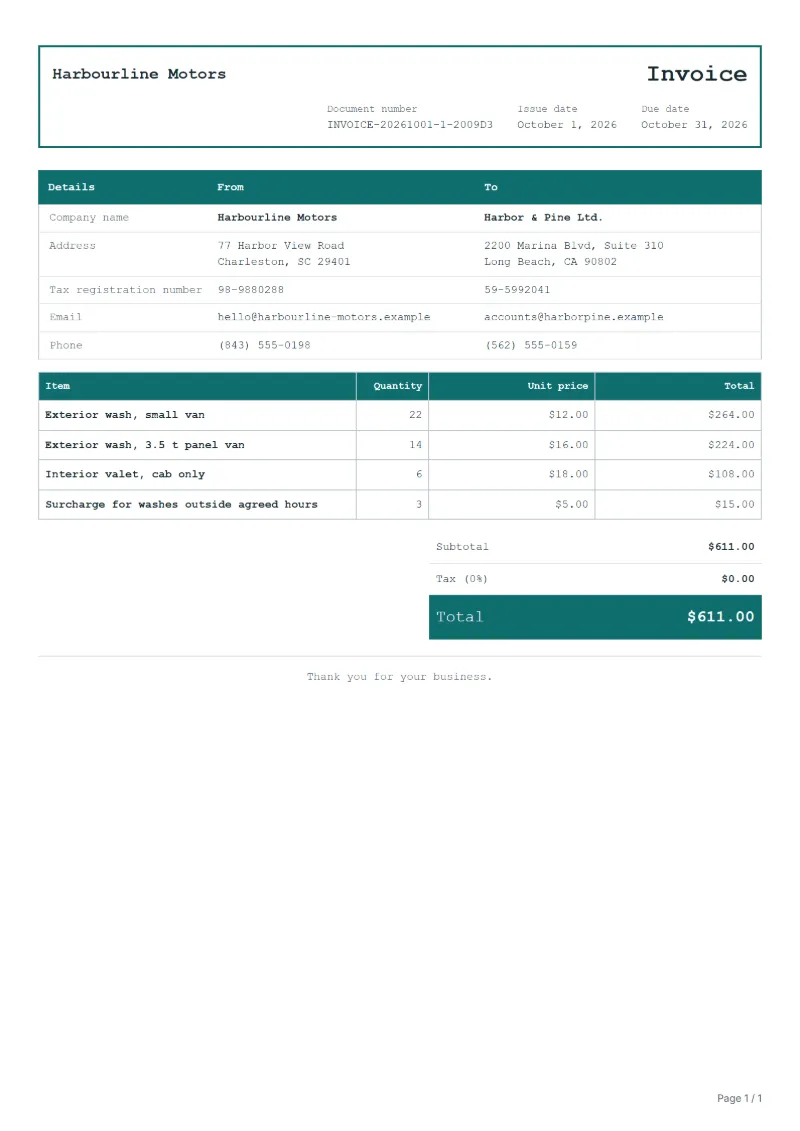
| Item | Quantity × unit price | Amount |
|---|---|---|
| Exterior wash, small van | 22 × $12.00 | $264.00 |
| Exterior wash, 3.5 t panel van | 14 × $16.00 | $224.00 |
| Interior valet, cab only | 6 × $18.00 | $108.00 |
| Surcharge for washes outside agreed hours | 3 × $5.00 | $15.00 |
| Subtotal | $611.00 | |
| Sales tax (8%) | $48.88 | |
| Total | $659.88 | |
Net amount $611.00, sales tax $48.88, total payable $659.88.
What the document must show
The details an invoice has to show, and why each one matters, are set out in the guide below.
The sales tax depends on where the work is supplied, so set the rate that applies to your customer before sending.
Official rate reference: US government: state and local taxes
Full requirements: How to write an invoice: a step-by-step example
Frequently asked questions
Should I list every wash or only the totals per vehicle class?
Totals per class on the invoice, with the wash log attached or referred to. The log lets the fleet manager match each wash to a vehicle without crowding the invoice.
A van was washed twice in one day: do I bill both?
Bill both if the driver asked for both, and the log will show two times. If the second was a redo of a poor wash, leave it out and say so.
How is the sales tax worked out on this invoice?
The worked example above uses an example rate of 8%: $48.88 on a net amount of $611.00, for a total of $659.88. The editor recalculates all three when you change a quantity, a price or the country.
Can I change the layout and colour?
Yes. The editor offers other layouts and a document colour for the printed page. Changing them moves no figure: the lines and totals stay as they are, and the PDF, Word and Excel files follow the layout you pick.
Can I email it to the customer?
Yes, from your own mail app. With a free account, the editor’s download menu offers Email this document, which opens your mail app with a message about the document already written. QuoteBill sends nothing itself, so save the PDF and attach it before you send.
Read next
Reading for the Fleet car wash invoice template: How to write an invoice: a step-by-step example and Credit note vs invoice (and credit memo): how to issue one. The VAT and GST calculator works out the tax line for you.