Event proforma invoice template
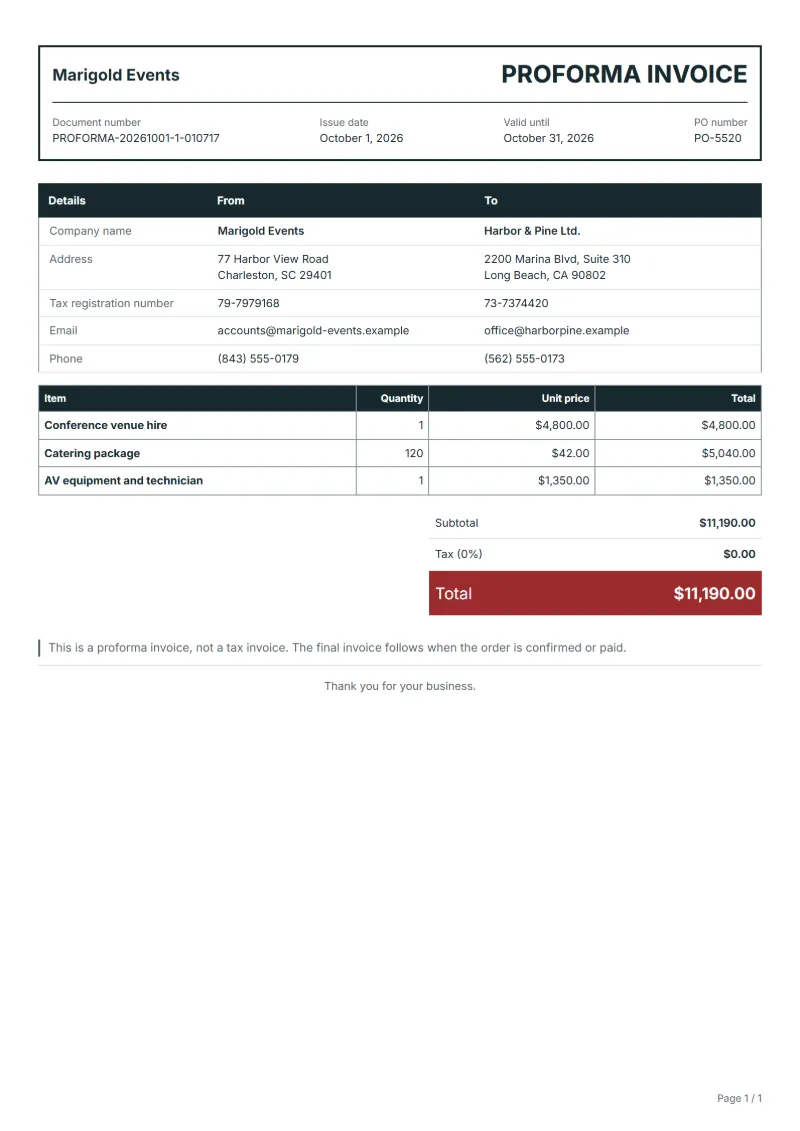
Event proforma invoice template: venue hire, catering and AV at the headcount you quoted, the deposit that confirms the booking and the validity date.
Templates by industry
- Conference venue hire
- Catering package
- AV equipment and technician
Preparation guide
Example workflow
Confirm goods and delivery terms
Example: confirm the quantity and unit price of "Conference venue hire", then the delivery terms, transport and insurance.
Set the validity and send
Check every line down to "AV equipment and technician", add the valid-until date and the prepayment account, and send the proforma to the buyer.
Invoice after payment or shipment
When the buyer pays or the goods ship, make the invoice from the proforma. The proforma stays unchanged as the offer the buyer accepted.
Venues and event companies send this proforma to a corporate client whose finance team will not pay a deposit without a document to process. It prices the room hire, catering per head for the expected attendance and the AV kit with a technician, all for one event date. The client’s procurement team often has to set you up as a supplier and place a formal order first, so send it early and expect the order number to come back for the final invoice.
Fields to prepare
- Deliverables and line items
- Conference venue hire, Catering package, AV equipment and technician: the goods or services and the quantities you intend to supply, at the prices you will invoice.
- Conference venue hire
- Give the room, the date and the hours, including set-up and breakdown time, since overtime is often charged by the hour.
- Catering package
- Price catering per head for the expected attendance and state the minimum number you will charge for if fewer people come.
- AV equipment and technician
- List the main equipment and the technician’s hours on site; extra hours or late requests usually go on the final invoice.
- Delivery terms
- State the delivery terms (such as an Incoterm and the named place), how the goods travel and who insures them.
- Validity and prepayment
- Give the date the prices hold until and, if you ask for payment in advance, the account the buyer pays into.
- Scope to agree
- Give the event date and headcount the prices assume, the deposit that confirms the booking and when the final invoice will follow.
Before sending
- Does “Conference venue hire” match the buyer’s order in quantity, unit price and currency?
- Does “Catering package” need an HS code or country of origin in its description for the buyer’s import licence?
- Can “AV equipment and technician” ship in the quantity shown once the prepayment arrives?
Show 3 more
- Check that quantities, unit prices and currency match what the buyer ordered or asked you to quote.
- Add the HS code and country of origin to the item descriptions if the buyer needs them for an import licence.
- Check the valid-until date, the delivery terms and the prepayment account, and that the document says it is not a tax invoice.
Worked example with sample figures
The figures below are invented to show how the template adds up: 3 lines in USD, with an example tax rate of 8%.
| Item | Quantity × unit price | Amount |
|---|---|---|
| Conference venue hire | 1 × $4,800.00 | $4,800.00 |
| Catering package | 120 × $42.00 | $5,040.00 |
| AV equipment and technician | 1 × $1,350.00 | $1,350.00 |
| Subtotal | $11,190.00 | |
| Sales tax (8%) | $895.20 | |
| Total | $12,085.20 | |
Net amount $11,190.00, sales tax $895.20, total to pay in advance $12,085.20.
- Buyer’s order number: PO-5520.
What the document must show
The details a proforma invoice has to show, and why each one matters, are set out in the guide below.
The sales tax depends on where the work is supplied, so set the rate that applies to your customer before sending.
Official rate reference: US government: state and local taxes
Full requirements: Proforma vs invoice and down payment invoice
Frequently asked questions
The client’s finance team asked for supplier details. What do I send?
Usually your registered company details, tax number and bank details on letterhead or on their own supplier form. Send them with the proforma, and ask for the client’s order number so you can quote it on the final invoice.
What if attendance changes after the deposit is paid?
Agree a date for the final headcount and a minimum number you charge for. The final invoice then uses the confirmed number, with the deposit paid on this proforma deducted.
How is the sales tax worked out on this proforma invoice?
The worked example above uses an example rate of 8%: $895.20 on a net amount of $11,190.00, for a total of $12,085.20. The editor recalculates all three when you change a quantity, a price or the country.
Can I download it as Excel, Word or PDF?
Yes. A PDF needs no account: fill in the template and use Print / PDF. The Excel and Word files download from this page with a free account, and the spreadsheet keeps its formulas, so changing a quantity updates the tax and the total.
Can I add my logo and signature?
Yes. The From section of the editor has a place for your company logo and for a signature or seal image. Uploading a picture needs a free account, and a member can keep both in settings so that every new document starts with them.
Read next
Reading for the Event proforma invoice template: Proforma vs invoice and down payment invoice and Deposit invoice: bill upfront, then invoice the balance. The currency converter converts the amounts when you quote in another currency.