Email marketing invoice template
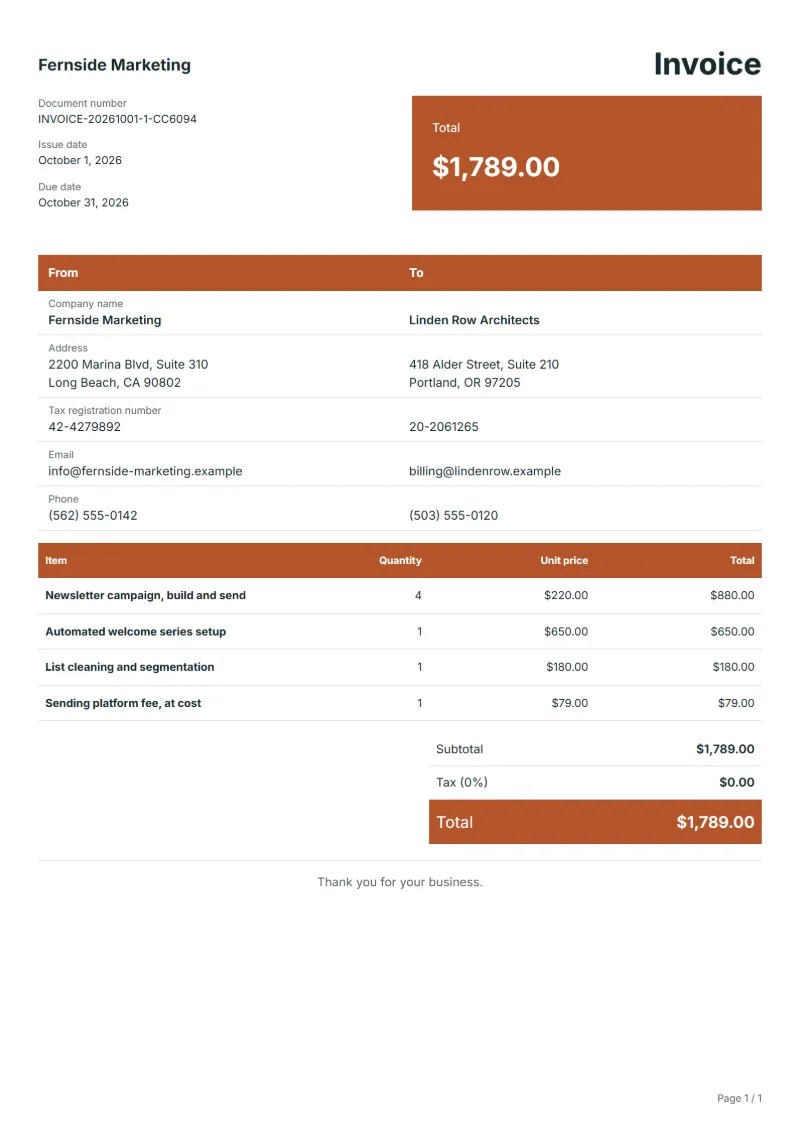
Email marketing invoice template: newsletter campaigns built and sent, a welcome series set up once, list clean-up and the sending platform fee at cost.
Templates by industry
- Newsletter campaign, build and send
- Automated welcome series setup
- List cleaning and segmentation
- Sending platform fee, at cost
Preparation guide
Example workflow
Confirm scope and quantities
Example: reconcile the approval and work record for "Newsletter campaign, build and send" to establish the quantity for this invoice.
Record delivery and acceptance
Check completion for every line, including "Sending platform fee, at cost". Deliver the activity log, results with reporting periods and data sources, and a list of next actions.
Send the billing record
Send the final charges, delivery reference and due date to the customer, then reconcile payment against the invoice number.
Email marketing mixes one-off build work with monthly routine. An automated welcome series is set up once and keeps running; newsletters go out several times a month; the list needs cleaning whenever bounces pile up; and the sending platform charges by the size of the list. This template bills each of those in its own way: campaigns per send, the automation as a one-time build, list work as a task, and the platform fee passed on at cost with its own invoice behind it.
Fields to prepare
- Deliverables and line items
- Newsletter campaign, build and send, Automated welcome series setup, List cleaning and segmentation, Sending platform fee, at cost: record the quantities actually supplied and the service period.
- Newsletter campaign, build and send
- Name each campaign by subject line and send date; a campaign built but not sent is billed only if the client cancelled it late.
- Automated welcome series setup
- Say how many emails the series contains and what triggers it, and bill later edits to it separately.
- List cleaning and segmentation
- Give the list size before and after cleaning, so the client sees what was removed.
- Sending platform fee, at cost
- Attach the platform's invoice and name the billing month it covers.
- Channels and activity volume
- List the accounts, sites or campaigns and the number of publishing, analysis or optimization tasks.
- Period and reporting basis
- Set the service period, comparison baseline, client-supplied data and report delivery date.
- Scope to agree
- Count campaigns actually sent, bill the set-up of automations once, and pass the sending platform's fee on separately so the client can see its own running cost.
Before sending
- Does “Newsletter campaign, build and send” show the quantity actually supplied, not the quantity first quoted?
- Is “Automated welcome series setup” charged at the rate the customer agreed to, with any change approved?
- Is “List cleaning and segmentation” finished and accepted, or does it belong on a later invoice?
Show 4 more
- Does “Sending platform fee, at cost” show the quantity actually supplied, not the quantity first quoted?
- Identify whether media spend, paid tools and content production are included.
- Base acceptance on agreed work and reports without treating a ranking or revenue result as a guaranteed deliverable.
- Match completed work to the order or approval record, and confirm the payment due date and amounts already received.
Worked example with sample figures
The figures below are invented to show how the template adds up: 4 lines in USD, with an example tax rate of 8%.
| Item | Quantity × unit price | Amount |
|---|---|---|
| Newsletter campaign, build and send | 4 × $220.00 | $880.00 |
| Automated welcome series setup | 1 × $650.00 | $650.00 |
| List cleaning and segmentation | 1 × $180.00 | $180.00 |
| Sending platform fee, at cost | 1 × $79.00 | $79.00 |
| Subtotal | $1,789.00 | |
| Sales tax (8%) | $143.12 | |
| Total | $1,932.12 | |
Net amount $1,789.00, sales tax $143.12, total payable $1,932.12.
What the document must show
The details an invoice has to show, and why each one matters, are set out in the guide below.
The sales tax depends on where the work is supplied, so set the rate that applies to your customer before sending.
Official rate reference: US government: state and local taxes
Full requirements: How to write an invoice: a step-by-step example
Frequently asked questions
Should open and click rates appear on the invoice?
Keep them in the campaign report. The invoice bills work delivered; mixing results into it suggests the fee depends on them, which it usually does not.
The platform account is in the client's name. What changes?
Then the client pays the platform directly and the fee line disappears. Your invoice covers only the campaigns, the set-up and the list work.
How is the sales tax worked out on this invoice?
The worked example above uses an example rate of 8%: $143.12 on a net amount of $1,789.00, for a total of $1,932.12. The editor recalculates all three when you change a quantity, a price or the country.
Is this template free?
Yes. You can fill in this template and print it or save it as a PDF without an account, and there is no payment step and no watermark on the document. Saving it to your account and downloading Excel or Word files need a free account.
Can I add my logo and signature?
Yes. The From section of the editor has a place for your company logo and for a signature or seal image. Uploading a picture needs a free account, and a member can keep both in settings so that every new document starts with them.
Read next
Reading for the Email marketing invoice template: How to write an invoice: a step-by-step example and Credit note vs invoice (and credit memo): how to issue one. The VAT and GST calculator works out the tax line for you.