E-commerce commercial invoice template
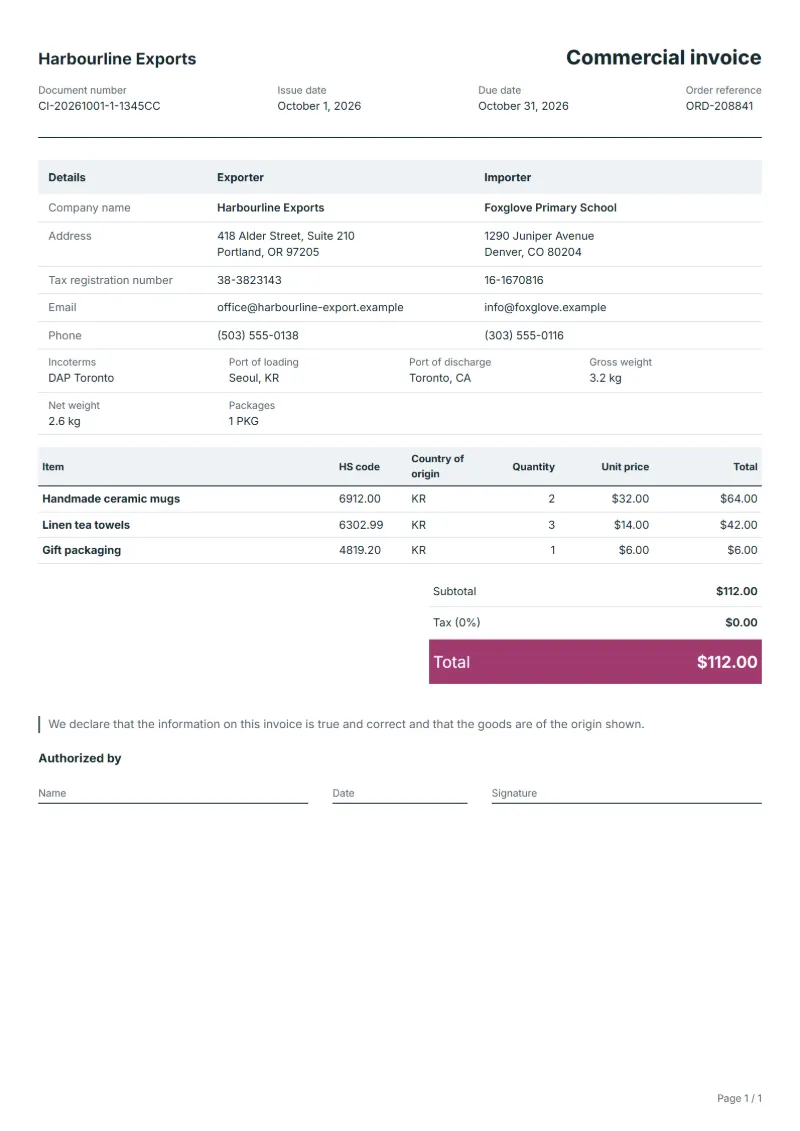
Commercial invoice template for e-commerce parcels: order number, buyer address, each item described plainly with its HS code and origin, and who pays duties.
Templates by industry
- Handmade ceramic mugs
- Linen tea towels
- Gift packaging
Preparation guide
Example workflow
Describe the goods
Example: describe "Handmade ceramic mugs" precisely enough for customs, with HS code, origin, quantity and unit value.
Add the shipment details
Enter the Incoterms, ports of loading and discharge, gross and net weight and packages, and check "Gift packaging" matches the packing list.
Sign and send
Sign the declaration and send the invoice to the importer and your freight forwarder or customs broker with the other shipping documents.
Online shops use this commercial invoice for one parcel sent to a private buyer abroad by post or courier. It usually travels in a document pouch on the box, and many couriers also want the same data typed into their shipping system. The values come from the order: what the buyer actually paid for each item. With DAP terms, as in the sample, the buyer pays any import charges on arrival, which is worth saying at checkout as well.
Fields to prepare
- Deliverables and line items
- Handmade ceramic mugs, Linen tea towels, Gift packaging: give each line a precise description, its HS code, country of origin, quantity and value.
- Handmade ceramic mugs
- Describe the mugs by material and use, such as ‘stoneware coffee mug, handmade’, rather than by the product name in your shop.
- Linen tea towels
- Give the fibre content, for example 100% linen, because customs classifies textiles by what they are made of.
- Gift packaging
- If the buyer paid for gift wrapping, enter what they paid; if it went in free, ask your courier whether it needs a line at all.
- Parties and terms
- Name the exporter, the importer and, if the goods go to someone else, the consignee, with the Incoterms, the currency and the payment terms.
- Shipment
- Give the ports of loading and discharge, the shipping method, the gross and net weight, the number of packages and the reason for export.
- Scope to agree
- Quote the order number and the buyer's delivery address, describe each item plainly rather than as "gift" or "merchandise", and say who pays duties on arrival.
Before sending
- Does “Handmade ceramic mugs” have the HS code and country of origin customs will check?
- Is the value of “Linen tea towels” the price actually paid, in the invoice currency?
- Do the quantity and weight of “Gift packaging” match the packing list?
Show 3 more
- Check the Incoterms, ports, weights and package count against the shipping documents, and the importing country's customs requirements.
- Check each HS code and country of origin with your freight forwarder or customs broker; QuoteBill does not look them up.
- Check the tax rate: it starts at 0% because exports are often zero-rated, so change it if your sale is taxed.
Worked example with sample figures
The figures below are invented to show how the template adds up: 3 lines in USD, with no tax added.
- Handmade ceramic mugs (HS 6912.00, origin KR): 2 × $32.00 = $64.00
- Linen tea towels (HS 6302.99, origin KR): 3 × $14.00 = $42.00
- Gift packaging (HS 4819.20, origin KR): 1 × $6.00 = $6.00
Value of the goods $112.00, tax $0.00, invoice total $112.00.
- Sales order ORD-208841.
- Shipment: DAP Toronto, from Seoul, KR to Toronto, CA; gross weight 3.2 kg, net weight 2.6 kg, 1 PKG.
What the document must show
These details make a commercial invoice easier to approve and to file.
- Exporter and importer names and addresses, and the consignee if different
- Invoice number and date
- Each item with description, HS code, origin, quantity, unit price and value
- Incoterms, currency and payment terms
- Ports of loading and discharge, shipping method
- Gross and net weight, number of packages
- A signed declaration
A commercial invoice starts at 0%, because exports are often zero-rated; change the rate if your sale is taxed. The sales tax depends on where the work is supplied, so set the rate that applies to your customer before sending.
Official rate reference: US government: state and local taxes
Frequently asked questions
What value do I enter for an item sold at a discount?
The price the buyer actually paid after the discount, as your order record shows it. For an item given away in a promotion, enter a realistic value rather than zero and keep a note of how you arrived at it.
The buyer asks me to mark the parcel as a gift. Can I?
Not when the goods were sold. Declaring a sale as a gift to avoid import charges is a false declaration. Describe the goods as sold, quote the order number, and tell the buyer that import charges may be due.
An order goes out in two parcels. Does each need an invoice?
Yes. Each parcel carries an invoice for what is inside it, with the same order number on both, so the buyer and customs can match the two parts of one order.
How is the sales tax worked out on this commercial invoice?
A commercial invoice starts at 0%, because exports are often zero-rated; change the rate if your sale is taxed. The sales tax depends on where the work is supplied, so set the rate that applies to your customer before sending. With nothing added, the total in the worked example above stays at the net amount of $112.00.
Can I change the layout and colour?
Yes. The editor offers other layouts and a document colour for the printed page. Changing them moves no figure: the lines and totals stay as they are, and the PDF, Word and Excel files follow the layout you pick.
Read next
Reading for the E-commerce commercial invoice template: Proforma vs invoice and down payment invoice and Unpaid invoice: follow-ups, part payments and statements. The currency converter converts the amounts when you invoice in another currency.