Computer repair invoice template
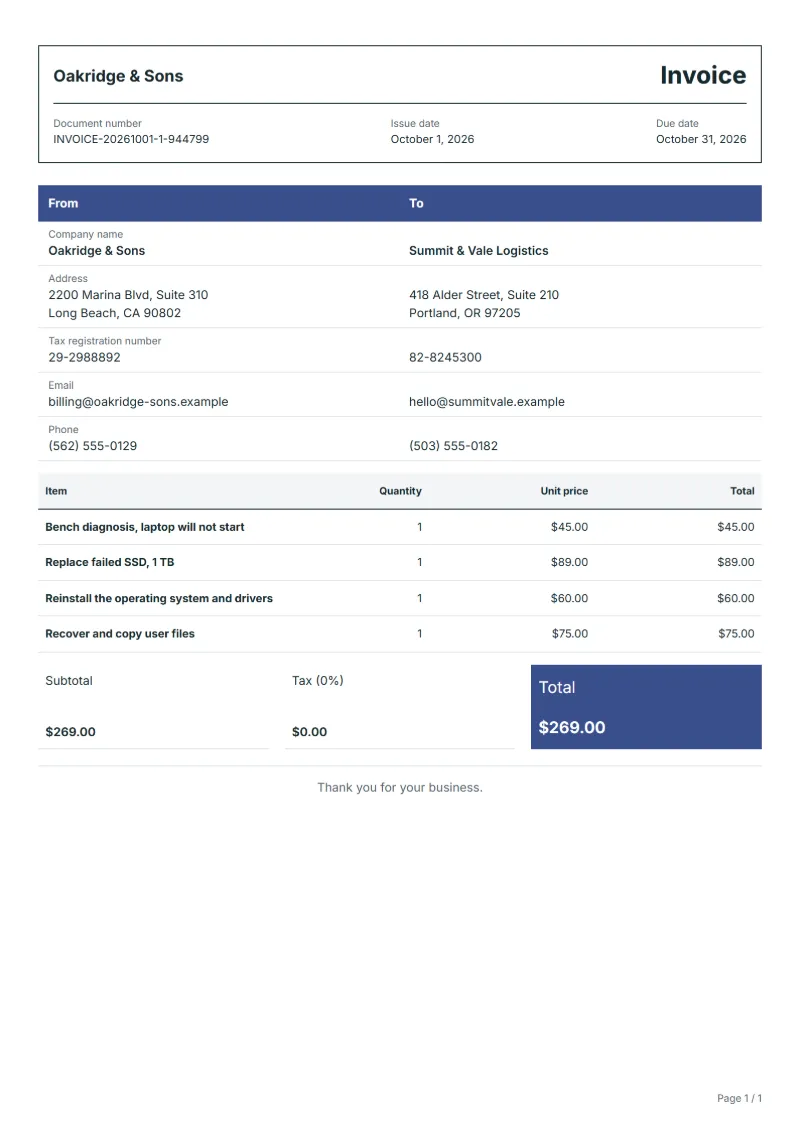
Computer repair invoice template: diagnosis, replaced parts with serial numbers, software reinstall and data recovery on separate lines, with device details.
Templates by industry
- Bench diagnosis, laptop will not start
- Replace failed SSD, 1 TB
- Reinstall the operating system and drivers
- Recover and copy user files
Preparation guide
Example workflow
Confirm scope and quantities
Example: reconcile the approval and work record for "Bench diagnosis, laptop will not start" to establish the quantity for this invoice.
Record delivery and acceptance
Check completion for every line, including "Recover and copy user files". Deliver the service record, materials used, unresolved issues and the agreed next visit date.
Send the billing record
Send the final charges, delivery reference and due date to the customer, then reconcile payment against the invoice number.
A computer repair is part hardware, part software and part data, and customers care most about the last. This invoice keeps the three apart. The bench diagnosis has its own line, so the customer can see whether its fee was set against the repair. Replaced parts carry their capacity and serial number, the reinstall is listed as work rather than a product, and data recovery says what was saved and onto what. That record helps if the customer later finds a file missing.
Fields to prepare
- Deliverables and line items
- Bench diagnosis, laptop will not start, Replace failed SSD, 1 TB, Reinstall the operating system and drivers, Recover and copy user files: record the quantities actually supplied and the service period.
- Bench diagnosis, laptop will not start
- Write the fault as the customer described it and what you found, such as a drive not detected in the firmware.
- Replace failed SSD, 1 TB
- Give the brand, capacity and serial number of the new drive, and how long you guarantee it.
- Reinstall the operating system and drivers
- Say which operating system version and licence were used; a reinstall with the customer’s own licence is labour only.
- Recover and copy user files
- List the folders recovered and the medium they were copied to, and note anything that could not be read.
- Assets and visits
- Record the asset or area, visit dates, visit count and access arrangements.
- Labor and materials used
- Separate labor hours, quantities of parts or consumables, and work outside the recurring scope.
- Scope to agree
- Identify the device by model and serial number, say whether the diagnosis fee is deducted from the repair, and record what data was recovered and where it was copied.
Before sending
- Does “Bench diagnosis, laptop will not start” show the quantity actually supplied, not the quantity first quoted?
- Is “Replace failed SSD, 1 TB” charged at the rate the customer agreed to, with any change approved?
- Is “Reinstall the operating system and drivers” finished and accepted, or does it belong on a later invoice?
Show 4 more
- Does “Recover and copy user files” show the quantity actually supplied, not the quantity first quoted?
- Match extra parts and return-visit charges to approved work.
- Record the initial condition and the post-service checks.
- Match completed work to the order or approval record, and confirm the payment due date and amounts already received.
Worked example: a laptop that will not start
The figures are an example, in dollars, with an example tax rate of 8%. A technician finds a failed SSD in a laptop, fits a new 1 TB drive, reinstalls the system with the customer’s licence and copies their documents and photos back from the old drive.
- Diagnosis: one line, charged because the price list does not credit it.
- Parts and labour: the SSD with its serial number, the reinstall as work.
- Data: the folders recovered, copied onto the new drive.
| Item | Quantity × unit price | Amount |
|---|---|---|
| Bench diagnosis, laptop will not start | 1 × $45.00 | $45.00 |
| Replace failed SSD, 1 TB | 1 × $89.00 | $89.00 |
| Reinstall the operating system and drivers | 1 × $60.00 | $60.00 |
| Recover and copy user files | 1 × $75.00 | $75.00 |
| Subtotal | $269.00 | |
| Sales tax (8%) | $21.52 | |
| Total | $290.52 | |
The four lines total $269.00; tax at 8% is $21.52, and the customer pays $290.52 on collection. The old drive is noted as returned or wiped.
Common mistakes on computer repair invoices
- Leaving out the serial number of the device or of the new part.
- Billing a reinstall as if a licence were included when it was not.
- Writing "data recovered" without saying what and to where.
- Charging the diagnosis twice, once on its own and again inside the repair price.
What the document must show
These details make an invoice easier to approve and to file.
- Your business name, address and registration or tax number
- The customer's name and address
- Issue date and a document number you do not reuse
- Each line item with quantity, unit price and amount
- Tax shown separately from the net amount, and the total payable
- Payment terms: due date, bank details or accepted payment methods
The sales tax depends on where the work is supplied, so set the rate that applies to your customer before sending.
Official rate reference: US government: state and local taxes
Frequently asked questions
Is the diagnosis fee deducted when the customer goes ahead?
Only if your price list says so. Show the diagnosis on its own line and, if it is credited, add a note saying so rather than quietly leaving it out.
What do I write when the data could only be partly recovered?
List what was recovered and what was not, and the condition of the drive. A customer who knows exactly what is missing is less likely to dispute the charge.
How long should I guarantee a replaced part?
Write the period you offer on your own work and parts. The manufacturer’s warranty on the part is separate, which is why its serial number belongs on the line.
The customer wants the old drive back: does that change anything?
Not the amounts, but note that the old drive was returned. If you wiped or destroyed it at their request, write that instead.
How is tax calculated on this template?
The sales tax depends on where the work is supplied, so set the rate that applies to your customer before sending. The editor keeps the net amount, the tax and the total apart, and recalculates all three when you change a quantity, a unit price or the country setting.
Can I use it in another language or currency?
Yes. The document language can be set to any of 33 languages, and changing the country setting updates the currency, the date format and the tax rate.
Read next
Reading for the Computer repair invoice template: How to write an invoice: a step-by-step example and Credit note vs invoice (and credit memo): how to issue one. The VAT and GST calculator works out the tax line for you.