Sample shipment commercial invoice template
No commercial value invoice template for samples: swatches, prototypes and catalogs with a realistic customs value, HS codes, origin and the reason for export.
Templates by industry
- Fabric swatches
- Product prototypes
- Printed catalogs
Preparation guide
Example workflow
Describe the goods
Example: describe "Fabric swatches" precisely enough for customs, with HS code, origin, quantity and unit value.
Add the shipment details
Enter the Incoterms, ports of loading and discharge, gross and net weight and packages, and check "Printed catalogs" matches the packing list.
Sign and send
Sign the declaration and send the invoice to the importer and your freight forwarder or customs broker with the other shipping documents.
Manufacturers, mills and brands send this invoice with swatches, prototypes and catalogues going to a buyer, an agent or a trade fair abroad. No money changes hands, yet customs still needs a description and a value for every line, so the invoice declares what the goods are worth and why they travel. Prototypes are valued at what they cost to make. If one has to come back, ask your forwarder about temporary export before it leaves, because that is arranged at departure.
Fields to prepare
- Deliverables and line items
- Fabric swatches, Product prototypes, Printed catalogs: give each line a precise description, its HS code, country of origin, quantity and value.
- Fabric swatches
- Give the fibre content and the cut size of the swatches, for example 20 × 30 cm, so the line can be classified like any other fabric.
- Product prototypes
- Value each prototype at what it cost to make, not at its future retail price, and say what it is made of.
- Printed catalogs
- Give the number of copies and the page count, and value each copy at what it cost to print.
- Parties and terms
- Name the exporter, the importer and, if the goods go to someone else, the consignee, with the Incoterms, the currency and the payment terms.
- Shipment
- Give the ports of loading and discharge, the shipping method, the gross and net weight, the number of packages and the reason for export.
- Scope to agree
- Give "samples, no commercial value" as the reason for export, still put a realistic value on each item for customs, and mark any sample that will be returned.
Before sending
- Does “Fabric swatches” have the HS code and country of origin customs will check?
- Is the value of “Product prototypes” the price actually paid, in the invoice currency?
- Do the quantity and weight of “Printed catalogs” match the packing list?
Show 3 more
- Check the Incoterms, ports, weights and package count against the shipping documents, and the importing country's customs requirements.
- Check each HS code and country of origin with your freight forwarder or customs broker; QuoteBill does not look them up.
- Check the tax rate: it starts at 0% because exports are often zero-rated, so change it if your sale is taxed.
Filling in a sample shipment invoice: a worked example
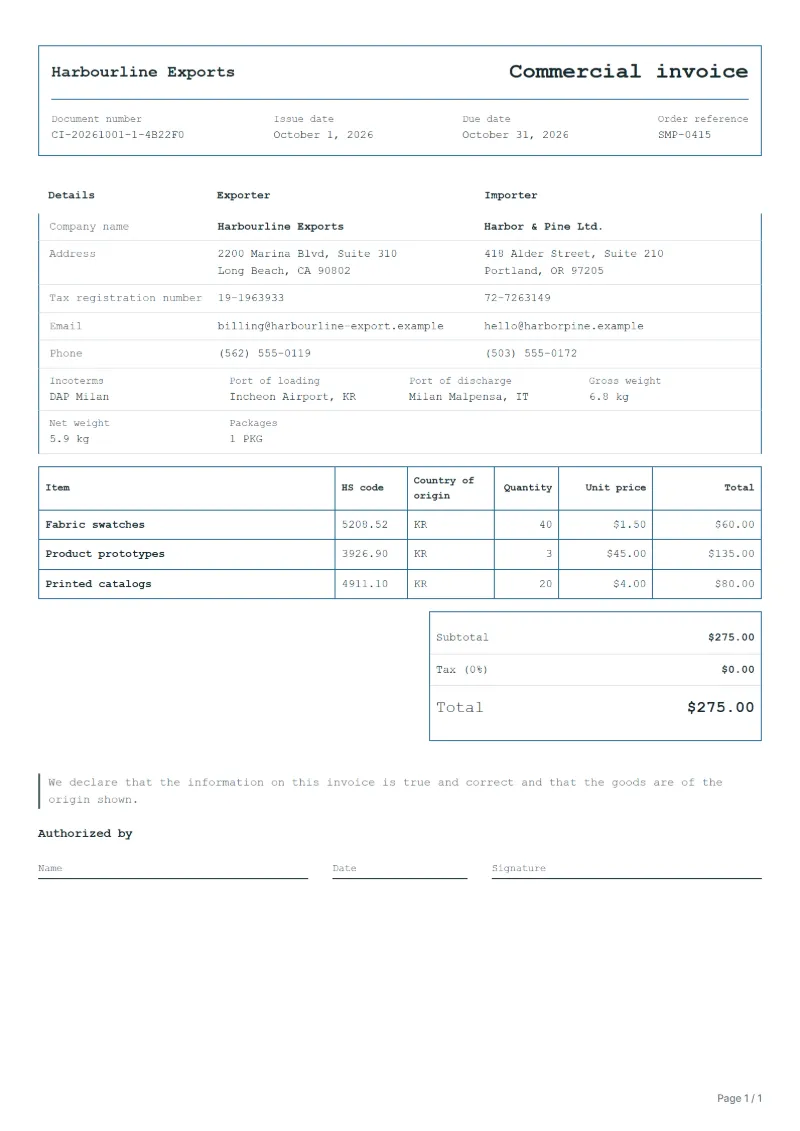
The figures are an example, in dollars. A manufacturer sends samples to a buyer abroad: swatches, prototypes and printed catalogs. Even when samples are free, the shipment usually needs a description and a value for customs; the importing country's rules decide the details.
- Parties: name the exporter, the importer and the consignee if it is someone else.
- Goods: describe each item plainly, with the quantity and the unit value you declare.
- Samples: state that the goods are samples and whether anything is charged for them.
- Totals: the declared value is $275.00; add the weights and the number of packages from your packing records.
| Item | Quantity × unit price | Amount |
|---|---|---|
| Fabric swatches | 40 × $1.50 | $60.00 |
| Product prototypes | 3 × $45.00 | $135.00 |
| Printed catalogs | 20 × $4.00 | $80.00 |
| Total | $275.00 | |
The three lines add up to a declared value of $275.00. Check the importing country's rules for samples before you ship.
Common mistakes on a sample shipment invoice
- Writing "samples" as the only description, with no item, quantity or material.
- Leaving the value empty because nothing is charged; state the value you declare for each line.
- Using one value on the invoice and another on the shipping paperwork.
- Forgetting the commodity code or the origin where the importing country asks for them.
- Not saying that the goods are samples and whether they are charged for.
What the document must show
These details make a commercial invoice easier to approve and to file.
- Exporter and importer names and addresses, and the consignee if different
- Invoice number and date
- Each item with description, HS code, origin, quantity, unit price and value
- Incoterms, currency and payment terms
- Ports of loading and discharge, shipping method
- Gross and net weight, number of packages
- A signed declaration
A commercial invoice starts at 0%, because exports are often zero-rated; change the rate if your sale is taxed. The sales tax depends on where the work is supplied, so set the rate that applies to your customer before sending.
Official rate reference: US government: state and local taxes
Frequently asked questions
What goes in the payment terms when nothing is paid?
Replace the sample terms with a short statement such as ‘No charge: samples for evaluation’. Keep the currency and the declared values on the lines, because customs reads them even when no payment is due.
Can samples travel in the same consignment as a paid order?
They can, but keep them on lines of their own marked free of charge, or put them on a separate invoice. Mixed into the paid lines, they make the unit prices of the order look wrong.
How is tax calculated on this template?
A commercial invoice starts at 0%, because exports are often zero-rated; change the rate if your sale is taxed. The sales tax depends on where the work is supplied, so set the rate that applies to your customer before sending. The editor keeps the net amount, the tax and the total apart, and recalculates all three when you change a quantity, a unit price or the country setting.
Can I download it as Excel, Word or PDF?
Yes. A PDF needs no account: fill in the template and use Print / PDF. The Excel and Word files download from this page with a free account, and the spreadsheet keeps its formulas, so changing a quantity updates the tax and the total.
How is the document numbered?
QuoteBill gives each new document a unique number of its own. A member can switch to numbers in sequence in settings, such as CI-2026-0001: one sequence for each kind of document, starting again every calendar year. A number you type yourself is kept as it is.
Read next
Reading for the Sample shipment commercial invoice template: Proforma vs invoice and down payment invoice and Unpaid invoice: follow-ups, part payments and statements. The currency converter converts the amounts when you invoice in another currency.