Childcare receipt template
Childcare receipt template for nannies, babysitters and daycares: the child, dates and hours of care, the amount paid and the carer's details.
Templates by industry
- Weekly childcare
- After-school pickup
- Meals and snacks
Preparation guide
Example workflow
Match the payment to the invoice
Example: check the payment for "Weekly childcare" against the invoice it settles: the invoice number, the amount received and any balance still owed.
Record the payment
Enter the payment date, the payment method and the amount received, and check each line this payment covers, down to "Meals and snacks".
Send the receipt
Send the receipt to the customer and mark the invoice as paid; if a balance remains, keep the invoice open for it.
Nannies, babysitters, childminders and daycare centres give this receipt to parents, usually weekly or monthly. Parents often need it beyond their own records, for an employer’s childcare benefit or a tax claim, which is why it names the child, the dates and hours of care and the carer’s contact and tax details. Weekly care, after-school pickups and meals sit on separate lines, since some schemes treat meals differently from care.
Fields to prepare
- Deliverables and line items
- Weekly childcare, After-school pickup, Meals and snacks: the lines this payment covers, as they appear on the invoice it settles.
- Weekly childcare
- Give the week’s dates and the hours of care, and say whether days missed through illness are still charged under your terms.
- After-school pickup
- Count the pickups in the period, and put any late-collection fee on its own line rather than adding it to this one.
- Meals and snacks
- Bill meals by the day or by the portion; keeping them apart helps parents whose benefit covers care but not food.
- Payment details
- Record the payment date, the method (bank transfer, card or cash) and the amount received, exactly as it arrived.
- Invoice reference
- Quote the number of the invoice this payment settles; for a part payment, note the balance still owed.
- Scope to agree
- Give the child's name, the dates and hours of care, and the carer's contact and tax details, which parents often need to claim the cost.
Before sending
- Does “Weekly childcare” match the line on the invoice this payment settles?
- Has the money for “After-school pickup” actually arrived, in full or in part?
- Is “Meals and snacks” shown at the amount received, with any balance still owed noted?
Show 3 more
- Confirm the money has actually arrived before you issue the receipt.
- Check that the amount received matches the invoice, and note any difference as a balance or an overpayment.
- Quote the invoice number it settles, and keep receipt numbers in a sequence of their own.
Filling in a receipt: a worked example
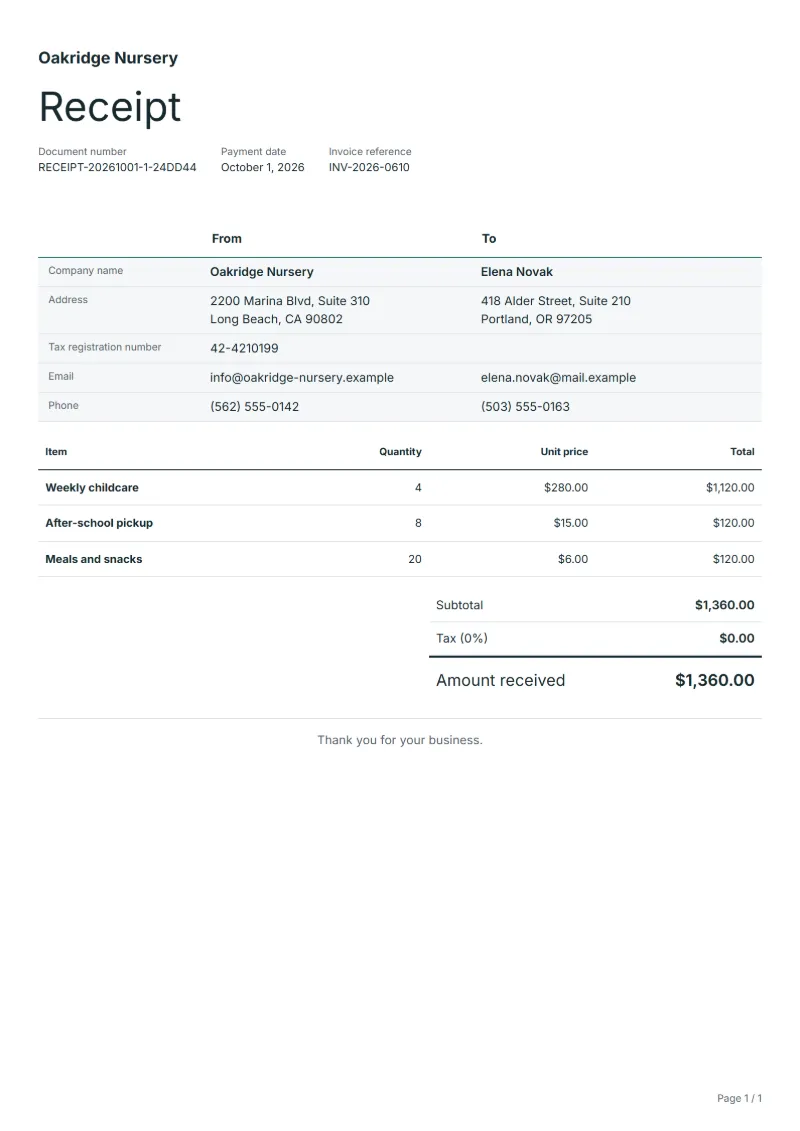
The figures are an example, in dollars. A customer pays the invoice below in full, so the receipt confirms what was received and that nothing is left to pay.
- Payment: write the date the money arrived, how it was paid and the amount received, $1,360.00.
- Invoice: quote the number of the invoice it settles and the lines it covers, which add up to $1,360.00.
- Balance: write $0.00, or "paid in full", so the customer can close the invoice in their books.
| Item | Quantity × unit price | Amount |
|---|---|---|
| Weekly childcare | 4 × $280.00 | $1,120.00 |
| After-school pickup | 8 × $15.00 | $120.00 |
| Meals and snacks | 20 × $6.00 | $120.00 |
| Invoice total | $1,360.00 | |
| Received | $1,360.00 | |
| Still owed | $0.00 | |
Check the arithmetic before you issue it: the lines add up to $1,360.00 and you received $1,360.00, so nothing is left to pay.
Common receipt mistakes
- Issuing the receipt before the money has arrived; a promise to pay is not a payment.
- Writing only "paid", without the amount, the date or the method.
- Leaving out the number of the invoice it settles, so the customer cannot close the right invoice in their books.
- Rounding or combining lines so that the receipt no longer matches the invoice it settles.
- Marking a part payment as paid in full and losing track of the balance.
- Reusing a receipt number, or numbering receipts in the sequence of your invoices.
What the document must show
These details make a receipt easier to approve and to file.
- Your business name and address, and your tax number if you are registered
- Receipt number and issue date (the date the payment arrived)
- Who paid
- How they paid: bank transfer, card or cash
- What the payment is for, and the number of the invoice it settles
- The amount received, with any tax it includes shown separately
- For a part payment, the balance still owed
The sales tax depends on where the work is supplied, so set the rate that applies to your customer before sending.
Official rate reference: US government: state and local taxes
Frequently asked questions
Can I give parents one receipt for the whole year?
Yes, many carers do this as well as the regular receipts, listing the total paid for each child in the year with the period and your tax details. Check first which format the parent’s employer or tax office expects.
Do parents get a receipt for days the child did not attend?
If your terms charge for booked days whether or not the child comes, the receipt shows the booked days as paid. Note the absences, so the record matches what actually happened.
How is tax calculated on this template?
The sales tax depends on where the work is supplied, so set the rate that applies to your customer before sending. The editor keeps the net amount, the tax and the total apart, and recalculates all three when you change a quantity, a unit price or the country setting.
Is a receipt the same as an invoice?
No. An invoice asks for payment; a receipt confirms a payment you have received. Issue it after the money arrives, quote the invoice number it settles, and show any balance still owed.
Can I email it to the customer?
Yes, from your own mail app. With a free account, the editor’s download menu offers Email this document, which opens your mail app with a message about the document already written. QuoteBill sends nothing itself, so save the PDF and attach it before you send.
Read next
Reading for the Childcare receipt template: What a receipt must show (and receipt vs invoice) and Unpaid invoice: follow-ups, part payments and statements. To add tax or check a total, use the VAT and GST calculator.