Bookkeeping invoice
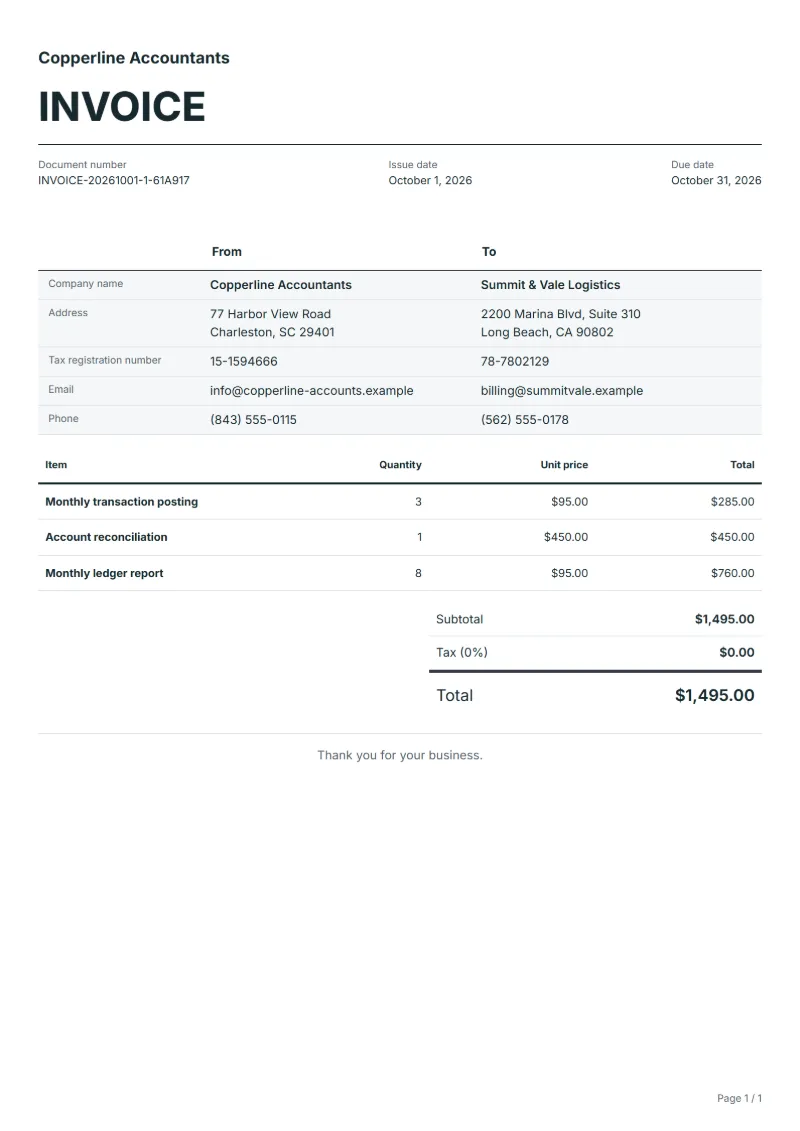
Invoice template for bookkeepers: monthly transaction posting, account reconciliation and monthly ledger report. Fill it in online or download Excel or Word.
Templates by industry
- Monthly transaction posting
- Account reconciliation
- Monthly ledger report
Preparation guide
Example workflow
Confirm scope and quantities
Example: reconcile the approval and work record for "Monthly transaction posting" to establish the quantity for this invoice.
Record delivery and acceptance
Check completion for every line, including "Monthly ledger report". Match the client-approved version to the delivered file list and record unresolved items separately.
Send the billing record
Send the final charges, delivery reference and due date to the customer, then reconcile payment against the invoice number.
Bookkeepers invoice small businesses monthly with this template for keeping their books up to date. Posting the month’s transactions is priced by volume or as a fixed fee, reconciling the bank and card accounts is a separate task, and the ledger report is what the client receives at the end. It differs from an accountant’s invoice for year-end accounts or tax returns: everything here is recurring monthly work. Name the month the work relates to, usually the month before the invoice date.
Fields to prepare
- Deliverables and line items
- Monthly transaction posting, Account reconciliation, Monthly ledger report: record the quantities actually supplied and the service period.
- Monthly transaction posting
- Give the month and the number of transactions posted, or say that the fixed fee covers up to a stated volume.
- Account reconciliation
- Enter the number of accounts reconciled, such as two bank accounts and one card, and the period.
- Monthly ledger report
- Name the reports delivered, for example profit and loss and aged receivables, and the date they were sent.
- Processing period and volume
- Record the service month, transaction or headcount volume, source-data cutoff and missing inputs.
- Approval and delivery
- Name the client reviewer and define delivered files, submission date and included correction rounds.
- Scope to agree
- Record monthly posting counts, reconciled accounts, ledger reporting periods and missing supporting records.
Before sending
- Does “Monthly transaction posting” show the quantity actually supplied, not the quantity first quoted?
- Is “Account reconciliation” charged at the rate the customer agreed to, with any change approved?
- Is “Monthly ledger report” finished and accepted, or does it belong on a later invoice?
Show 3 more
- Agree charges for late inputs and corrections after the cutoff.
- Use necessary service references on the invoice without including detailed personal records.
- Match completed work to the order or approval record, and confirm the payment due date and amounts already received.
Worked example with sample figures
The figures below are invented to show how the template adds up: 3 lines in USD, with an example tax rate of 8%.
| Item | Quantity × unit price | Amount |
|---|---|---|
| Monthly transaction posting | 3 × $95.00 | $285.00 |
| Account reconciliation | 1 × $450.00 | $450.00 |
| Monthly ledger report | 8 × $95.00 | $760.00 |
| Subtotal | $1,495.00 | |
| Sales tax (8%) | $119.60 | |
| Total | $1,614.60 | |
Net amount $1,495.00, sales tax $119.60, total payable $1,614.60.
What the document must show
The details an invoice has to show, and why each one matters, are set out in the guide below.
The sales tax depends on where the work is supplied, so set the rate that applies to your customer before sending.
Official rate reference: US government: state and local taxes
Full requirements: How to write an invoice: a step-by-step example
Frequently asked questions
How do I charge for catching up on months of missing records?
Quote and bill catch-up work separately from the monthly fee, by month or by hours, and name the months covered. Mixing it into the regular line hides it and makes the next month look cheaper than it really is.
What if the client sends receipts after I closed the month?
If your terms charge for reopening a closed period, add a line for the late entries with their number and the month they belong to. Otherwise post them in the next month and say so on the report, so nothing is entered twice.
Should the transaction count on the invoice match the bookkeeping software?
Use the count the software shows for the period and say so in the line. If the client questions the volume, they can look up the same figure themselves instead of asking you for a list.
How is the sales tax worked out on this invoice?
The worked example above uses an example rate of 8%: $119.60 on a net amount of $1,495.00, for a total of $1,614.60. The editor recalculates all three when you change a quantity, a price or the country.
Can I download it as Excel, Word or PDF?
Yes. A PDF needs no account: fill in the template and use Print / PDF. The Excel and Word files download from this page with a free account, and the spreadsheet keeps its formulas, so changing a quantity updates the tax and the total.
Read next
Reading for the Bookkeeping invoice: How to write an invoice: a step-by-step example and Invoice numbering: sequences and corrections. The VAT and GST calculator works out the tax line for you.