A signed contract, its certificate and how to check it
When everyone has signed, you and every signer get three things: the signed copy, the signature certificate, which is QuoteBill’s own record of the signing process, and an evidence file that anyone with a copy can check in their browser, even after the contract has been deleted.
Simple electronic signature with an audit trail
- Frozen text with a SHA-256 fingerprint
- Hash-chained audit trail
- Checkable by anyone with a copy
What you get when everyone has signed
The signed copy. Print the contract or save it as a PDF from your contract page; each signer can do the same from their link for 30 days after completion. The copy carries the reference, the fingerprint and the signatures, followed by the certificate.
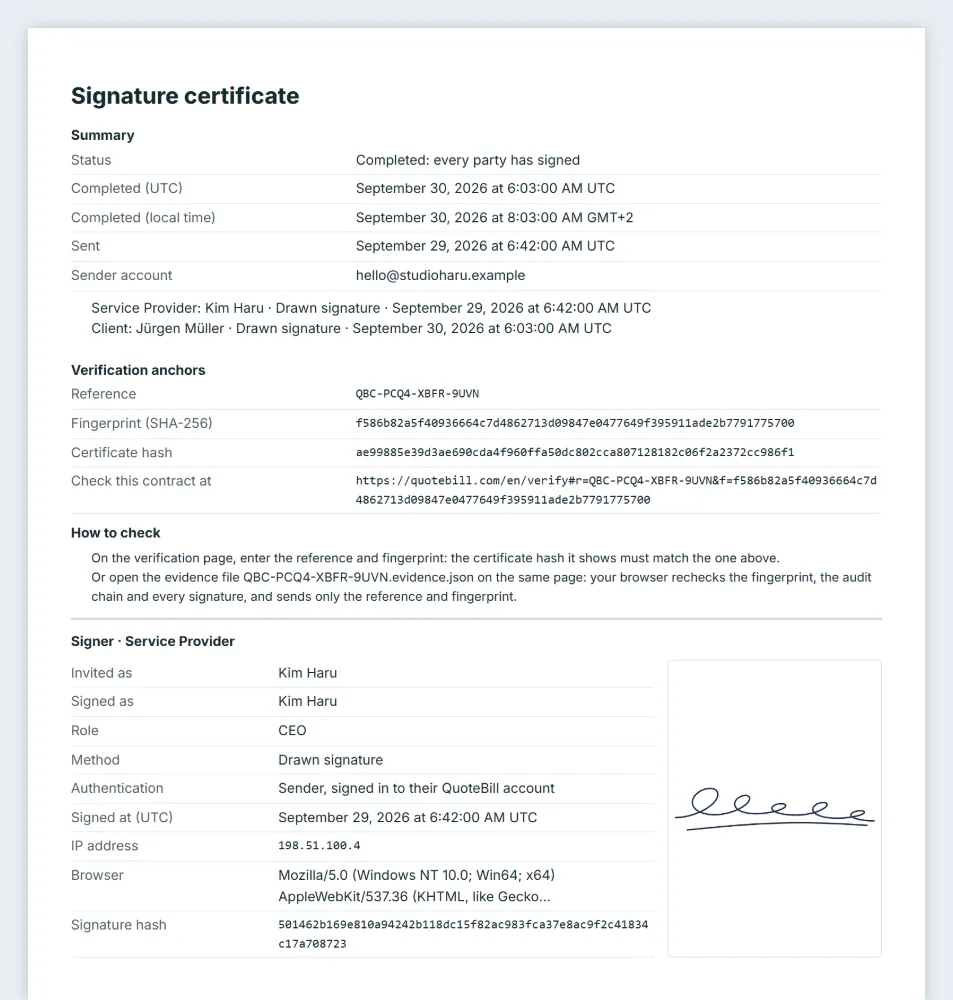
The signature certificate: QuoteBill’s own record of the signing process, printed after the contract. It is not a certificate issued by a trust service provider. It names who signed for each party, how and when, how each signer was let in, and every recorded event up to completion.
The evidence file (.evidence.json). A printed PDF looks different from one device to the next, so its bytes prove nothing; this file does not change. It holds the exact frozen text, its fingerprint and the certificate, and it is made in your own browser: QuoteBill does not store it. You can download it from your contract page once the contract is complete; a signer can, from their link, while it still opens.
The certificate and the check, as they look
A certificate for a made-up contract, and the verification page after a match.
The certificate: the summary, the verification anchors (reference, fingerprint, certificate hash and the address of the verification page), each signer, the consent given, the links issued and the audit trail. 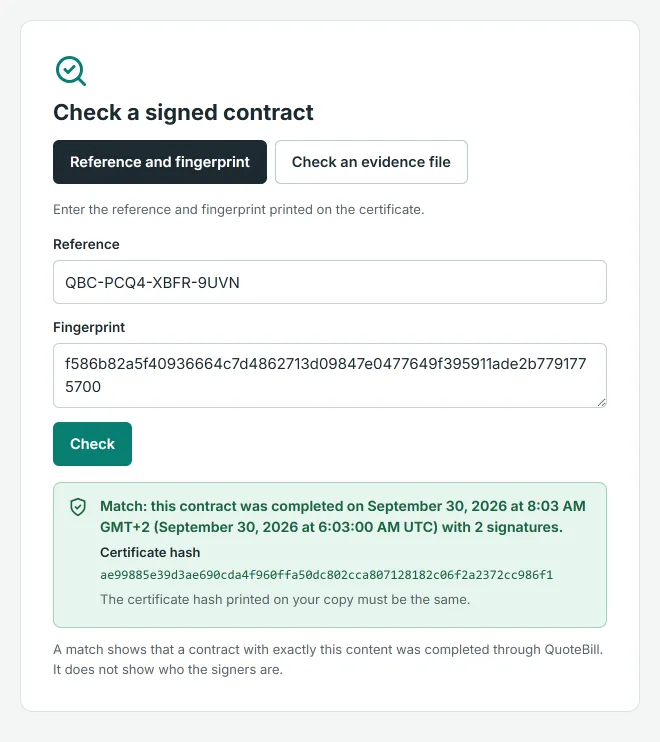
A match on the verification page: completed on this date with this many signatures, and the certificate hash your copy must show.
How to check a contract you received
You need nothing but the copy. The check is published line by line in the guide, so anyone can repeat it with their own tools.
Find the two values on the certificate
Under “Verification anchors” the certificate prints the reference (QBC-XXXX-XXXX-XXXX) and the fingerprint, a 64-character SHA-256 value. The address printed beside them opens the verification page with both already filled in.
Enter them on the verification page
A match says on which date a contract with exactly this text was completed, with how many signatures, and shows the certificate hash: it must be the same as the one printed on your copy. Nothing else is shown, no names and no content, and the answer survives the contract’s deletion.
Or drop the evidence file
On the same page, choose “Check an evidence file”. Your browser recomputes the fingerprint, walks the audit trail from its first hash to the completion hash and re-hashes every signature; only then does it ask QuoteBill whether the reference and fingerprint match, and it sends nothing else. When every check passes, the page shows the contract and the certificate from the file.
Know what a match means
A match shows that a contract with exactly this content was completed through QuoteBill and that the record is intact. It does not show who the signers were, and it is not a legal opinion.
What the certificate lists
Every party’s certificate is the same. Times are UTC, from QuoteBill’s database clock.
| Section | What it shows |
|---|---|
| Summary | The status (completed: every party has signed), the completion time in UTC and in your local time, when it was sent, the sender’s account email, and one line per party: who signed, by which method, when. |
| Verification anchors | The reference, the SHA-256 fingerprint of the frozen text, the certificate hash and the address of the verification page, followed by the two ways to check. |
| Each signer | The name they were invited as and the name they signed as, their role, the method (drawn, typed, or an uploaded seal or signature image), how they were let in (the sender signed in to their account; a link with the access code sent separately; or a link only), the number of wrong codes and of links issued, the time, IP address and browser of the signature, the signature hash and the signature itself. A signer who used the sender’s IP address is flagged. |
| Consent | The consent text each signer agreed to, word for word with its version and language, and who agreed to it. |
| Links issued | Every signing link issued for every party, with its number and the time. The links themselves are never stored, only their hashes. |
| Audit trail | Every event from creation to completion with its time: sent, link issued, opened, wrong code, locked, link turned off, consent, signed, declined, printed, reported, deadline changed, reminder prepared, completed. For an action by the sender or a signer, its IP address and browser too; a reminder, a deadline change and system events carry none. A report is listed, never its text. |
| Chain result | Whether the audit chain is intact, with the number of events, and the certificate hash: the hash of the completion event, which closes the chain. |
| Notes | That this records a simple electronic signature and QuoteBill does not verify identities; where the IP addresses come from; that the sender delivered the links; that look-alike characters in names are not detected; and, where a seal image was used, that it is a picture, not a registered seal. |
The IP address is the one QuoteBill’s hosting provider reports to its database. It identifies a network connection, not a person.
Questions about the evidence
Can I still check a contract after it was deleted?
Yes. When a completed contract is deleted, a small record without names or content stays so that copies remain verifiable: the reference, the fingerprint, the completion time, the number of signatures and the certificate hash.
What is the difference between the fingerprint, a signature hash and the certificate hash?
The fingerprint is the SHA-256 of the frozen text: it says which text was signed. A signature hash covers one signature: who signed, by which method, the consent, the time, the IP address. The certificate hash is the hash of the last event in the audit trail, and every earlier event feeds into it, so it stands for the whole record.
What if someone edits their PDF?
A match on the verification page confirms the reference and the fingerprint, not the words printed on a PDF. To check the words, check the evidence file: its text must reproduce the fingerprint. Your own evidence file, saved when the contract completed, settles what was signed.
Why is there no evidence file for my contract?
Contracts completed before evidence files existed, and the rare record too large for a file (more than 3 MB), can only be checked by their reference and fingerprint. The page says so instead of offering a file.
Who can download the evidence file, and until when?
The sender from the contract page, for as long as the contract is kept. Each signer from their own link, which stops working 30 days after completion; the completion notice you can copy asks them to save their copy in time.
What does the verification page keep about me?
Nothing about you. It answers from the completion record; the only thing it keeps is a short-lived, hashed rate-limit counter against abuse. The evidence file never leaves your browser; only the reference and the fingerprint are sent.
Where are the exact rules of the check?
In the e-signature guide, line by line: how the fingerprint, each event hash, each signature statement and the completion hash are computed. Anyone can repeat the check with their own tools.
Next
Evidence you can hand to anyone
Save the signed PDF and the evidence file as soon as the contract is complete. Whoever you give a copy to can check it, without an account and without asking you.