Trust and security
Nine things QuoteBill does to protect a contract. Nothing here asks you to take QuoteBill’s word for it: each point says what it means for you, what you can check yourself, and what it does not prove.
Simple electronic signature with an audit trail
- Frozen text, SHA-256 fingerprint
- Hash-chained audit trail
- No ads or analytics on contract pages
The certificate and the evidence file
1. What QuoteBill’s signature is
What it means: QuoteBill creates a simple electronic signature with an audit trail. It is not an advanced or qualified electronic signature in the sense of the EU eIDAS Regulation, and QuoteBill does not verify who signs: it records that the link and the access code you delivered were used.
What you can check: the consent text every signer agreed to is printed on every certificate, word for word, together with the note that this is a simple electronic signature.
What it does not prove: who the person behind the link was.
2. The text cannot change without notice
What it means: when you send, the contract is frozen and given a SHA-256 fingerprint, which every signer sees. A signature is refused if the fingerprint does not match the text shown, and any change to the content changes its fingerprint.
What you can check: the evidence file holds the frozen text; its SHA-256, computed with any tool, must equal the fingerprint on the certificate. The exact rule is published in the guide.
What it does not prove: that the text was right or fair. Read it before you sign.
3. Every step is recorded and chained
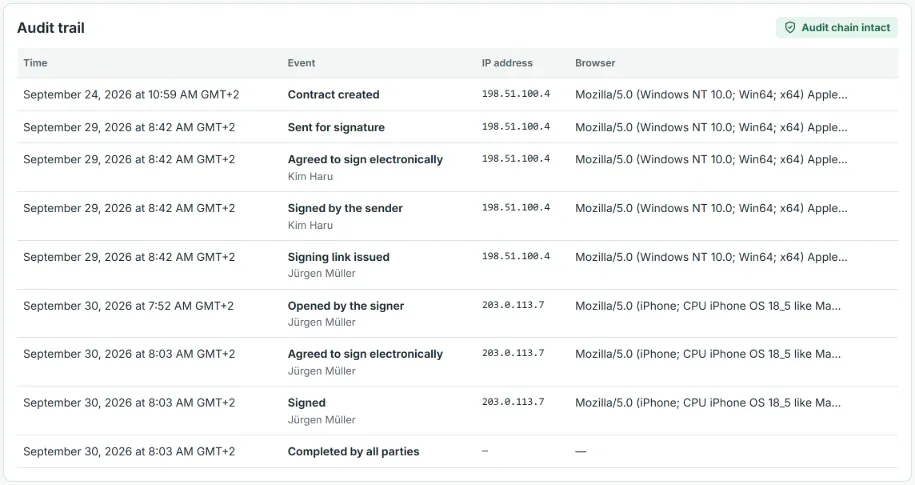
What it means: sending, each link issued, opening, wrong codes, consent, signing, declining, printing, reminders, deadline changes and completion are recorded with their time, and actions by the sender or a signer with their IP address and browser. Each entry carries the hash of the one before it, so a changed or removed entry breaks the chain.
What you can check: the verification page recomputes the whole chain in your browser from the evidence file, and your contract page shows the chain check for every contract you sent.
What it does not prove: that the times are certified (they come from QuoteBill’s database clock, not from a qualified time stamp), or that an IP address identifies a person.
How the chain holds together
Each event stores the hash of the one before it; the last hash, of the completion event, is the certificate hash printed on every copy.
4. The signing link and the access code
What it means: the secret part of a link comes after the # sign, which browsers do not include in the address they request, so it is not written to ordinary web-server access logs; QuoteBill stores only a hash of it. An 8-character access code, on by default, protects each link and is meant to travel by another route. After 5 wrong codes the link locks for 15 minutes, after 15 it stops working. You deliver the link and the code yourself, and a new link makes the old one useless at once.
What you can check: the certificate lists every link issued for every signer and the number of wrong codes, and flags a signer who used the sender’s IP address. When you send, the screen tells you where the code goes: never in the same message as the link.
What it does not prove: who used the link. For important contracts, hand over the code by phone or text message and confirm who you are dealing with yourself.
5. A certificate anyone can check
What it means: every copy carries the reference, the fingerprint and the certificate hash. The public verification page answers only whether a contract with this reference and fingerprint was completed, on which date, with how many signatures, and shows the certificate hash. It keeps answering after the contract has been deleted.
What you can check: enter the two values, or drop the evidence file: it is read in your browser, and only the reference and the fingerprint leave it.
What it does not prove: who the signers were. A match is not a legal opinion.
Where you can see each of these
Real screens with a made-up contract.
The audit trail
On your contract page: every event with its time, IP address and browser, and the chain check.
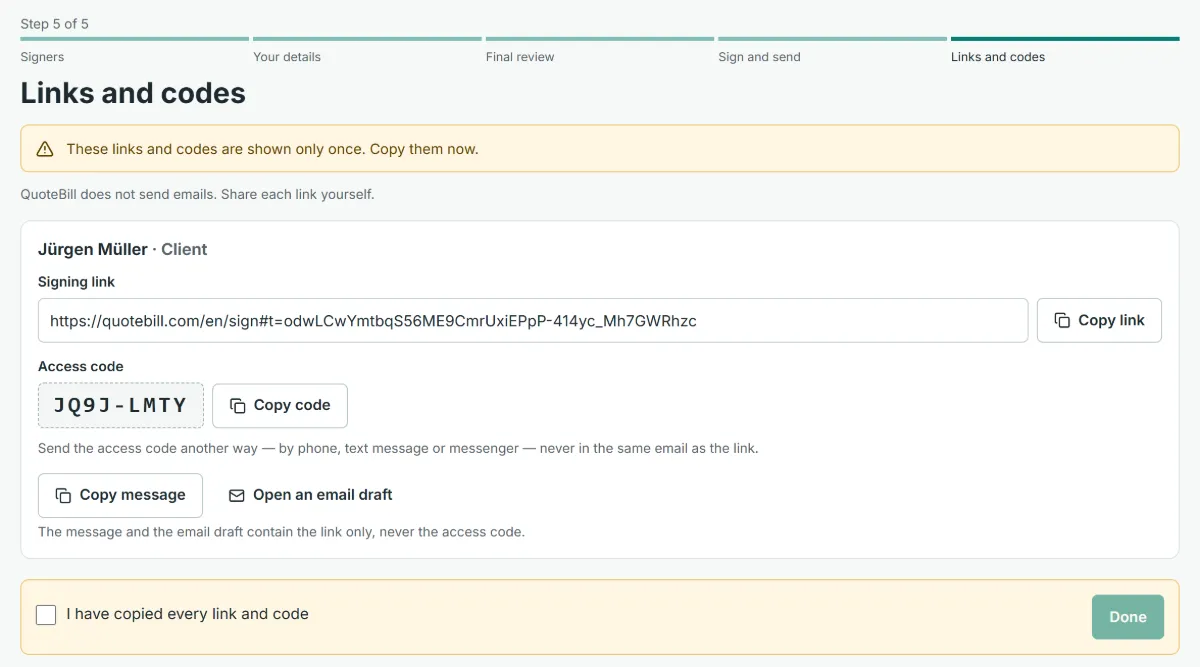
The links and codes
Shown once when you send, with the instruction to deliver the code another way.
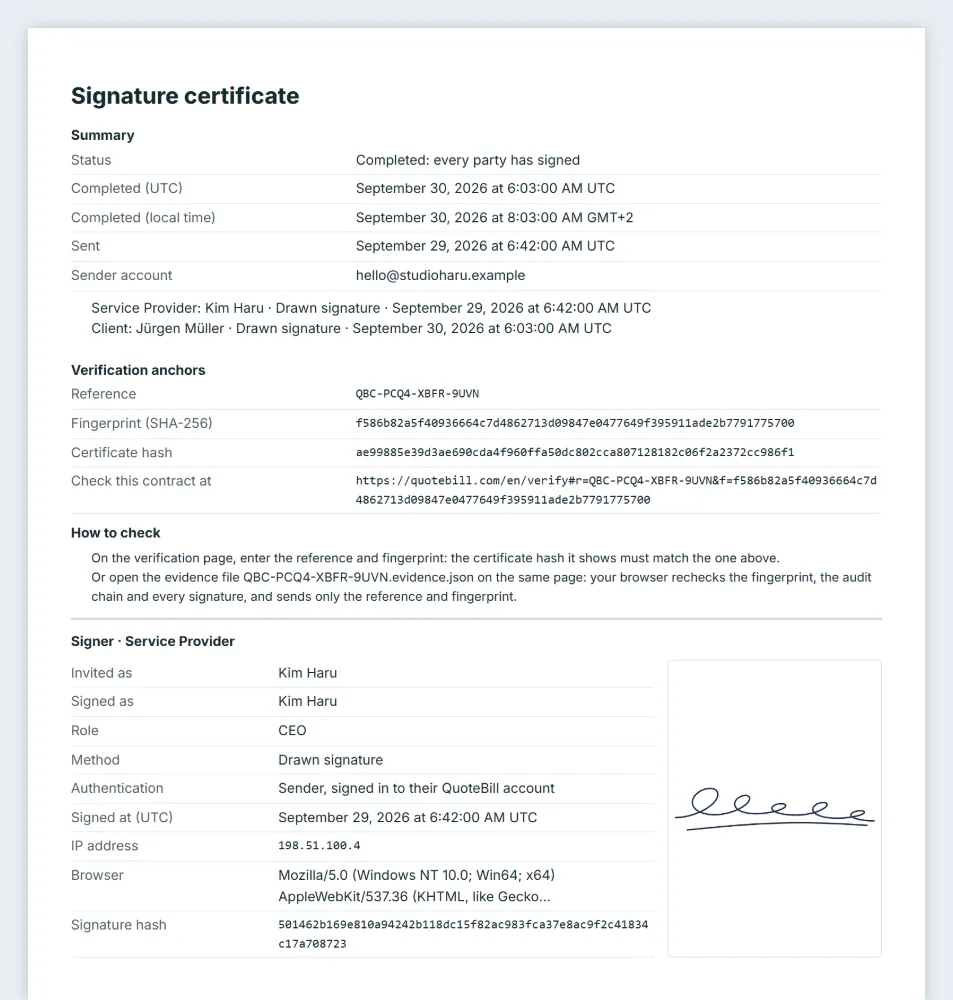
The certificate
Printed after every completed contract: anchors, signers, consent, links, audit trail, notes.
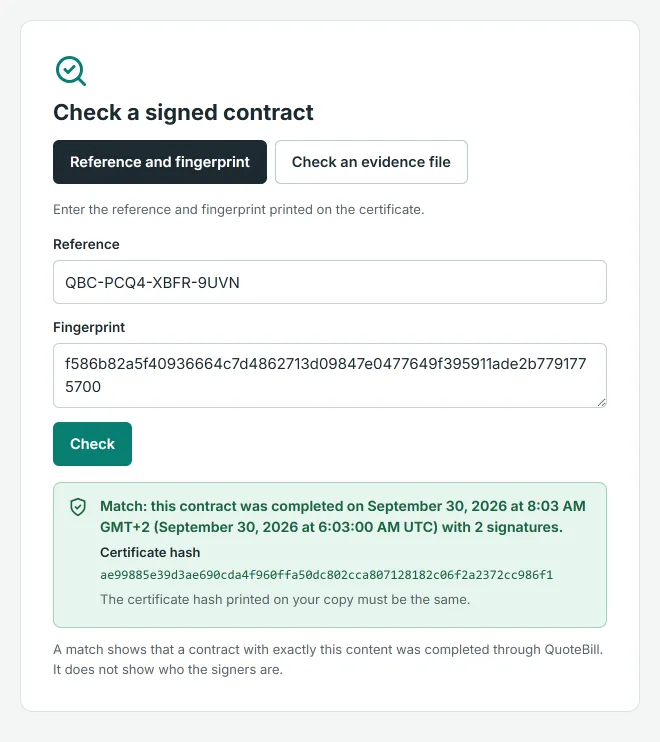
The verification page
Public, no account: enter the reference and fingerprint, or drop the evidence file.
6. What signers see and give
What it means: a signer needs no account, and their email address is optional. Before signing they read the five disclosures and the consent text: that they may decline or ask for a paper copy, that the time, their IP address and their browser are recorded and shared with the other parties, and that their link stops working 30 days after completion.
What you can check: open any signing link: the disclosures are on the screen before the signature, and the consent text is printed on the certificate.
What it does not prove: anything about the signer’s authority to sign for a company. The consent has them confirm it; QuoteBill does not check it.
7. What is stored, where and for how long
What it means: QuoteBill stores the contract text, the parties, the signers’ names and roles (and an email address if you entered one), the signatures, the consent texts, and for each event its time and, for actions by the sender or a signer, IP address and browser, in its database, hosted by Supabase. Sessions and access-code hashes are deleted when a contract closes; the hash of a link that has stopped working within 30 days; rate-limit counters within hours. When a sent contract is deleted, a minimal record to investigate misuse, which holds the sender’s account email and, only if the contract was reported, its content, is kept for 180 days and then deleted. A small verification record without names or content stays so that copies remain verifiable.
What you can check: the privacy notice lists each of these records and how long it is kept.
What it does not prove: that the operator cannot read your contract. The operator can technically access stored records, so keep your own signed PDF and evidence file.
8. No ads, no analytics on contract pages
What it means: the contract, signing and verification pages run in a zone of their own: a full page load in and out, no advertising, analytics, chatbot or popup code, a security policy that lets only QuoteBill’s own scripts run and connects only to QuoteBill’s database host, no framing, no caching by the browser and no search-engine indexing. No visitor tracking: the only counting is a short-lived, hashed rate limit against abuse.
What you can check: your browser’s developer tools show every host a page talks to; on the signing and verification pages that is QuoteBill and its database host, nothing else.
What it does not prove: the security of your own email or messenger, through which the link travels. That is why the code goes another way.
9. Limits, in one place
Do not send through QuoteBill: wills and anything about your estate or medical decisions; guarantees you give as a private person (void in electronic form in Korea, excluded in Germany); anything that must be notarised, such as land sales in Germany and many other countries, or that needs a witness in the room, such as a deed or a will in the UK; ending an employment contract or agreeing a fixed term in Germany; powers of attorney, trusts, negotiable instruments and title documents (excluded in New York, Canada, India and elsewhere); court filings and legally required notices such as eviction, foreclosure or insurance cancellation in the US; documents for which the law where you are demands a qualified electronic signature, a registered seal (인감, 実印) or a specific government form; and consumer contracts, unless you have checked the consumer rules that apply to you.
The five sample contracts are written for business-to-business use, and they are samples, not legal advice. The guide explains how the EU, the UK, the US, Korea, Japan and Germany treat a simple electronic signature, with the sources, and publishes the exact rules of the evidence check.
Read on
Check it before you trust it
Every mechanism on this page leaves something you can verify: a fingerprint, a hash chain, a certificate, a public check. Start with a sample contract and see for yourself.