Wholesale customer statement template
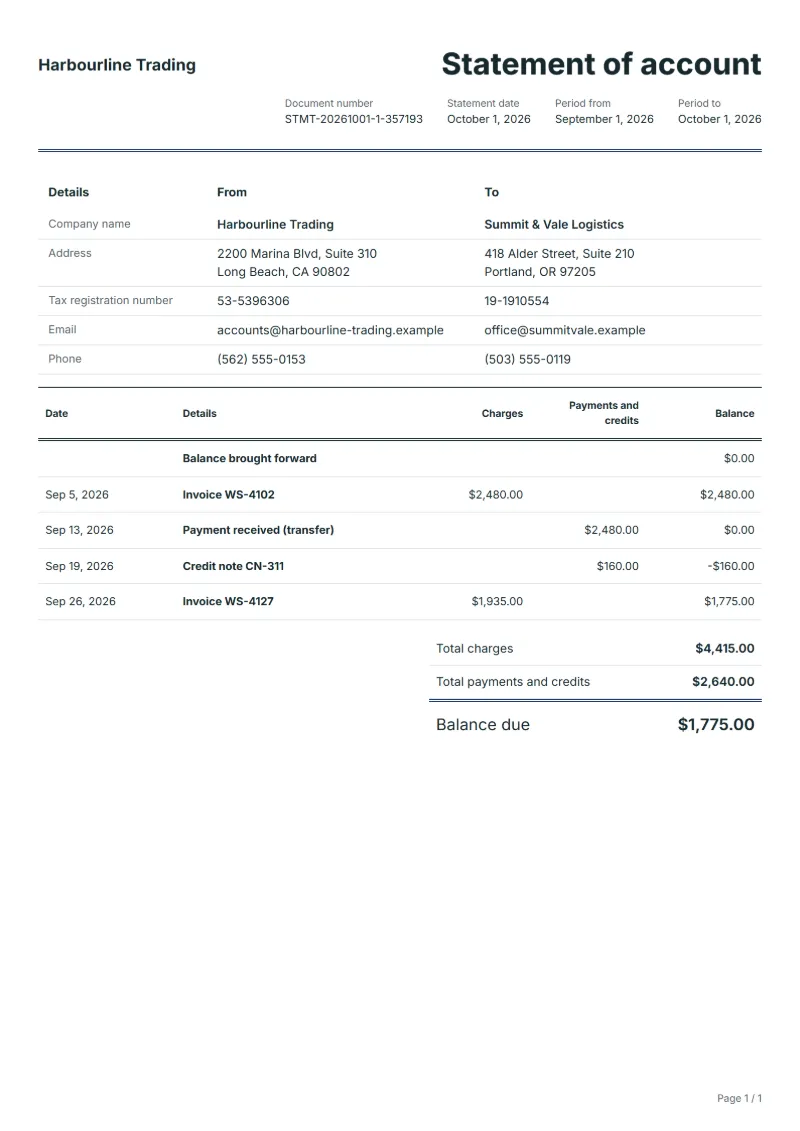
Wholesale customer statement template: the month's invoices, return credits and payments with a running balance and the balance due. Download Excel or Word.
Templates by industry
- Invoice WS-4102
- Payment received (transfer)
- Credit note CN-311
- Invoice WS-4127
Preparation guide
Example workflow
Collect the period's documents
Example: list "Invoice WS-4102" and every other invoice, receipt and credit note for the customer in the period, oldest first.
Check the running balance
Confirm the balance after each line, including "Invoice WS-4127", matches your accounts for this customer.
Send and follow up
Send the statement with the balance due and payment terms, then follow up on invoices past due.
Wholesalers send this statement at month end to trade customers who buy on account, often with dozens of invoices going to several delivery points. It lists every invoice, return credit and payment in date order with the balance after each, so the customer’s accounts payable team can reconcile it line by line against their own ledger. Invoices past their terms are flagged, which makes the statement the first step of credit control rather than a page nobody reads.
Fields to prepare
- Deliverables and line items
- Invoice WS-4102, Payment received (transfer), Credit note CN-311, Invoice WS-4127: list each invoice, payment and credit by date, with its document number.
- Invoice WS-4102
- Enter the invoice at the total it was issued for, with its date and the customer’s order number if their payables team files by it.
- Payment received (transfer)
- Record the date the money reached your account and the reference the customer used, so a transfer covering several invoices can be traced.
- Credit note CN-311
- List the return credit with the payments and credits at its full amount, quoting the invoice it reduced.
- Invoice WS-4127
- If its payment terms have not yet run out, show its due date so the customer does not read it as overdue.
- Period and balance brought forward
- Give the statement date and the period it covers, and carry over the balance from the previous statement.
- Charges and payments
- Enter each invoice under charges and each payment or credit note under payments and credits, at the amount on the document itself. "Add from my documents" copies those amounts from your saved documents for this customer.
- Scope to agree
- Match every invoice, return credit and payment on the customer's account for the month, and flag any invoice past its payment terms.
Before sending
- Does “Invoice WS-4102” carry the number and amount of the document it comes from?
- Has every payment for “Payment received (transfer)” been entered on the day it arrived?
- Would the customer find “Credit note CN-311” in their own ledger at the same amount?
Show 4 more
- Does “Invoice WS-4127” carry the number and amount of the document it comes from?
- Check the statement period, the balance brought forward and that every payment received is listed.
- List each invoice once, at the total it was issued for, and each credit note with the payments.
- Say how the customer can pay the balance due, and quote the numbers of any invoices past due.
Worked example with sample figures
The entries below are invented to show how the balance runs: 4 entries in USD over a period of 30 days.
- 26 days before the statement date: Invoice WS-4102, charged $2,480.00; balance $2,480.00
- 18 days before the statement date: Payment received (transfer), paid $2,480.00; balance $0.00
- 12 days before the statement date: Credit note CN-311, paid $160.00; balance -$160.00
- 5 days before the statement date: Invoice WS-4127, charged $1,935.00; balance $1,775.00
Balance due at the end of the period: $1,775.00.
What the document must show
These details make a statement of account easier to approve and to file.
- Your company name and address
- The customer's name
- Statement date and period
- Balance brought forward
- Each invoice, payment and credit with date and number
- Running balance and balance due
A statement adds no tax of its own: each line carries an invoice, a payment or a credit at the amount on that document, and the balance runs on from the balance brought forward.
Frequently asked questions
The customer paid several invoices with one transfer. How is that shown?
As one payment line at the amount received, with the invoice numbers it cleared in the description, taken from the customer’s remittance advice. If there was no advice, apply it to the oldest invoices first and say so on the statement.
The customer’s balance differs from ours. Where do we start?
Go back to the last balance both sides agreed and compare line by line from there. The usual causes are a payment still in transit, a credit note the customer has not booked yet, or a delivery they have not accepted.
The customer deducted damaged goods from a payment without a credit note. What do we show?
Show the payment at the amount actually received. The deduction stays in the balance until you issue a credit note for the damage or the claim is rejected; a note naming the claim avoids a second query.
How is the balance on this statement worked out?
A statement adds no tax of its own: each line carries an invoice, a payment or a credit at the amount on that document, and the balance runs on from the balance brought forward. In the worked example above the entries end at a balance of $1,775.00.
What is the difference between a statement and an invoice?
An invoice asks for payment for one sale. A statement lists invoices, payments and credits over a period and shows what is still owed; it does not replace the invoices.
Read next
Reading for the Wholesale customer statement template: Unpaid invoice: follow-ups, part payments and statements and Quote, proforma, invoice, receipt, credit note: which to use. For an account that is overdue, the Payment reminder template is the next step.